
Automating Assembly Creation in Creo
Learn how to automate assembly creation in Creo using Creo Toolkit and APIs. This guide explains the benefits, workflow, real-world applications, and best practices for automating assembly design to improve productivity, accuracy, and engineering efficiency.
7/16/20263 min read
Introduction
Creating assemblies in Creo is a fundamental part of mechanical product design. However, manually assembling multiple components, applying constraints, and managing design updates can be time-consuming and repetitive—especially for large or configurable products.
By automating assembly creation, engineers can generate complete assemblies in minutes instead of hours. Using Creo Toolkit or Creo APIs, companies can build intelligent applications that automatically insert components, apply assembly constraints, update parameters, and maintain company design standards.
Automation not only saves time but also improves consistency and reduces manual errors across engineering projects.
What is Assembly Automation in Creo?
Assembly automation is the process of using code to create and manage Creo assemblies automatically instead of building them manually.
With Creo Toolkit or APIs, engineers can:
Create new assemblies
Insert standard and custom components
Apply assembly constraints automatically
Update component parameters
Replace or suppress components
Generate configurable product assemblies
Integrate assembly creation with ERP and PLM systems
This approach simplifies complex assembly workflows and improves engineering productivity.
Why Automate Assembly Creation?
Manual assembly creation becomes challenging when working with:
Large assemblies
Product families
Frequently updated designs
Standard machine configurations
Configurable products
Automation ensures that assemblies are created faster, more accurately, and according to predefined engineering standards.
Benefits of Assembly Automation
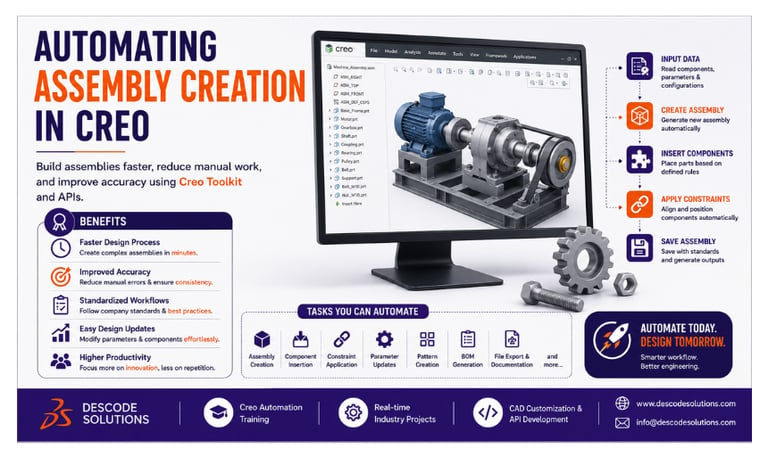
Faster Design Process
Automatically create complete assemblies in a fraction of the time required for manual modeling.
Improved Accuracy
Reduce human errors by automatically applying correct constraints, component positions, and design rules.
Standardized Workflows
Ensure every assembly follows company standards, naming conventions, and approved templates.
Easy Design Updates
Modify parameters or replace components automatically without rebuilding the entire assembly.
Higher Productivity
Engineers spend less time on repetitive tasks and more time on product development and innovation.
How Assembly Automation Works
A typical automation workflow includes:
Step 1: Start Creo
The automation application connects to an active Creo Parametric session.
Step 2: Read Input Data
Retrieve information such as:
Assembly type
Component list
Dimensions
Configuration options
Standard parts
Step 3: Create the Assembly
Generate a new assembly model automatically.
Step 4: Insert Components
Place the required parts into the assembly based on predefined rules.
Step 5: Apply Constraints
Automatically align and position components using assembly constraints.
Step 6: Save the Assembly
Store the completed assembly with the correct file name and project location.
Features That Can Be Automated
Creo automation supports a wide range of assembly operations, including:
Assembly creation
Component insertion
Constraint application
Pattern creation
Parameter updates
Standard hardware placement
Assembly validation
Mass property calculation
BOM generation
File export and documentation
Real-World Example
A manufacturing company builds industrial machines with over 150 standard components.
Before Automation
Engineers manually:
Created new assemblies
Inserted every component
Applied constraints
Updated parameters
Generated BOMs
Average assembly time: 5–6 hours
After Automation
Using Creo Toolkit:
✔ Assembly structure is created automatically.
✔ Components are inserted instantly.
✔ Constraints are applied automatically.
✔ BOMs are generated without manual effort.
✔ Standard naming conventions are followed.
Average assembly time: Less than 45 minutes
The company reduced design time significantly while improving consistency and reducing engineering errors.
Best Practices
For successful assembly automation:
Use standard templates
Create reusable automation modules
Validate component data before insertion
Implement proper error handling
Follow consistent naming conventions
Test with different assembly sizes
Document your code for future maintenance
These practices help create reliable and scalable automation solutions.
Industries Using Assembly Automation
Assembly automation is widely used in:
Automotive
Aerospace
Industrial Machinery
Heavy Equipment
Consumer Products
Medical Devices
Manufacturing
These industries rely on automation to accelerate product development and improve design quality.
Skills Required
To build assembly automation solutions, engineers should have knowledge of:
CAD Skills
Creo Parametric
Assembly Modeling
Part Design
Engineering Drawings
Programming Skills
C/C++
Creo Toolkit
Creo APIs
Object-Oriented Programming
Engineering Knowledge
Mechanical Design
Product Development
Assembly Constraints
Manufacturing Standards
Future of Creo Assembly Automation
As digital engineering continues to evolve, assembly automation is becoming more intelligent through:
Artificial Intelligence (AI)
Digital Twins
Model-Based Definition (MBD)
Cloud-Based Engineering
Smart Manufacturing
PLM Integration
These technologies enable faster, smarter, and more connected engineering workflows.
Conclusion
Automating assembly creation in Creo helps organizations reduce repetitive work, improve design accuracy, and accelerate product development. By leveraging Creo Toolkit and APIs, engineers can automatically generate assemblies, apply constraints, manage configurations, and maintain company standards with minimal manual effort.
As manufacturing becomes increasingly digital, assembly automation is an essential step toward improving engineering efficiency and staying competitive.
Contact Us
💼 At Descode Solutions, we specialize in:
✔ Creo Automation & Toolkit Training
✔ CAD Automation Training
✔ Real-time Industry Projects
✔ CAD Customization & API Development
📈 Learn smarter. Automate faster. Accelerate your career in CAD automation.
📩 Looking to automate your Creo assemblies or enhance your CAD automation skills? Connect with us today!
📞 Phone: +91 9544 123 321
🌐 www.descodesolutions.com
📧 info@descodesolutions.com
CAD Automation Training
Expert CAD Automation training for professionals and students
OUR COURSES
Contact
info@descodesolutions.com
(+91) 9544 123 321
Copyright © 2026 Descode Solutions LLP
NX Customization
CATIA Customization
AutoCAD Customization
Solidworks Customization
Solid Edge Customization
Revit Customization
Inventor Customization
Creo Customization

