
Creo Automation for Drawing Generation (Step-by-Step)
Learn how Creo automation helps engineers generate drawings faster, reduce repetitive manual work, and improve design consistency. This step-by-step guide explains how automation can simplify drawing creation in Creo for modern engineering workflows.
5/25/20262 min read
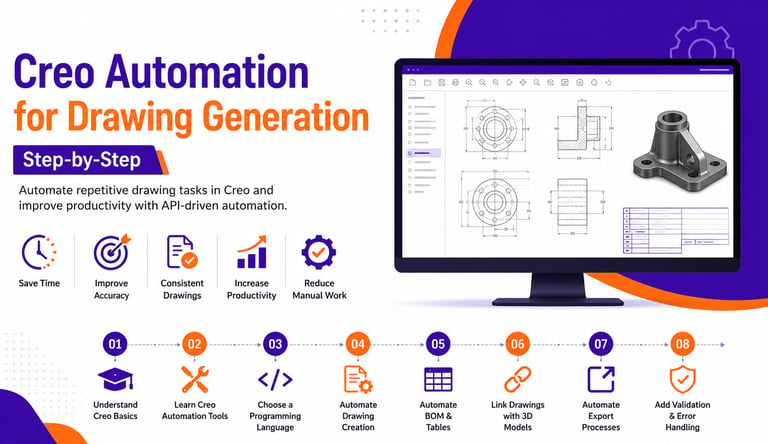

Overview
Engineering drawings are one of the most important parts of product development. In industries like manufacturing, automotive, aerospace, and industrial machinery, engineers often spend a large amount of time creating and updating drawings manually.
As projects become more complex, manual drawing generation can slow down productivity and increase the chances of errors.
This is where Creo automation becomes highly valuable.
Using APIs, macros, and custom automation tools, engineers can automate drawing generation inside Creo and significantly improve workflow efficiency.
What is Creo Drawing Automation?
Creo drawing automation is the process of automatically creating, updating, and managing engineering drawings using programming and automation tools.
Instead of manually placing views, dimensions, tables, and annotations every time, automation can perform these tasks automatically.
This helps engineers:
✔ Save time
✔ Reduce repetitive work
✔ Improve drawing consistency
✔ Minimize human errors
✔ Speed up product development
Why Automate Drawing Generation in Creo?
Manual drawing creation often involves repetitive tasks such as:
Creating standard views
Adding dimensions
Updating BOM tables
Generating title blocks
Exporting PDFs and DXFs
Revising drawings after model updates
For large projects, these tasks consume valuable engineering hours.
Automation solves these challenges efficiently.
Step-by-Step Creo Drawing Automation Process
Step 1: Understand Creo Basics
Before learning automation, you should understand:
Part modeling
Assemblies
Drawing creation
Parameters
Relations and configurations
A strong Creo foundation helps you automate workflows more effectively.
Step 2: Learn Creo Automation Tools
Creo provides multiple automation options such as:
Creo Toolkit
J-Link
VB API
Creo Parametric APIs
These APIs allow developers to control Creo using programming languages.
Step 3: Choose a Programming Language
Popular languages used for Creo automation include:
C#
Widely used for enterprise automation applications.
VB.NET
Good for beginners and Windows-based applications.
Java
Commonly used with Creo J-Link automation.
Python
Helpful for scripting and workflow automation.
Step 4: Automate Drawing Creation
Using Creo APIs, engineers can automate:
✔ Creating drawing sheets
✔ Generating standard views
✔ Placing dimensions automatically
✔ Inserting notes and annotations
✔ Updating title blocks
This reduces manual drafting effort significantly.
Step 5: Automate BOM and Tables
Automation can generate and update:
Bill of Materials (BOM)
Revision tables
Hole tables
Manufacturing notes
This improves documentation accuracy.
Step 6: Link Drawings with 3D Models
One major advantage of Creo automation is associativity.
When the 3D model changes:
✔ Drawing views update automatically
✔ Dimensions refresh instantly
✔ BOM data stays synchronized
This improves design consistency across projects.
Step 7: Automate Export Processes
Automation can batch export drawings into formats such as:
PDF
DXF
STEP
IGES
This saves time during manufacturing and documentation workflows.
Step 8: Add Error Handling and Validation
Professional automation tools should include:
✔ Missing view detection
✔ Drawing validation checks
✔ Error logging
✔ Automated warnings
This improves reliability and prevents failures.
Real-World Applications of Creo Drawing Automation
Manufacturing Industry
Generating production drawings automatically.
Automotive Industry
Managing large assemblies and design revisions.
Aerospace Industry
Creating standardized engineering documentation.
Industrial Equipment Design
Handling multiple product configurations efficiently.
Benefits of Creo Drawing Automation
Faster Drawing Generation
Reduce hours of manual work.
Improved Accuracy
Minimize drafting and documentation errors.
Better Standardization
Ensure consistent engineering documentation.
Higher Productivity
Engineers can focus more on design innovation.
Easy Revision Management
Update drawings quickly after design changes.
Future Scope of Creo Automation
As industries move toward smart manufacturing and Industry 4.0, automation skills are becoming increasingly important.
Engineers with Creo API and automation knowledge are highly valuable for companies looking to optimize engineering workflows
Conclusion
Creo drawing automation helps organizations reduce manual effort, improve accuracy, and accelerate engineering processes. From automatic view creation to BOM generation and export automation, automation tools can transform the way engineering teams work.
For students and professionals, learning Creo automation is a powerful step toward building future-ready CAD automation skills.
Contact Us
💼 At Descode Solutions, we specialize in:
✔ CATIA & NX Automation Training
✔ Real-time Industry Projects
✔ CAD Customization & API Development
📈 Learn smarter. Automate faster. Accelerate your career in CAD automation.
📩 Looking to master Creo automation and engineering customization? Connect with us today!
📞 Phone: +91 9544 123 321
🌐 www.descodesolutions.com
📧 info@descodesolutions.com
CAD Automation Training
Expert CAD Automation training for professionals and students
OUR COURSES
Contact
info@descodesolutions.com
(+91) 9544 123 321
Copyright © 2026 Descode Solutions LLP
NX Customization
CATIA Customization
AutoCAD Customization
Solidworks Customization
Solid Edge Customization
Revit Customization
Inventor Customization
Creo Customization

