Learning Curve Comparison of CAD Automation Tools
Explore the learning curve of popular CAD automation tools, including CATIA, Siemens NX, Creo, SolidWorks, and Solid Edge. Understand the skills required, difficulty levels, and the best starting points for engineers who want to build a career in CAD automation.
7/2/20264 min read
Introduction
CAD automation has become an essential skill in modern engineering. Companies across manufacturing, automotive, aerospace, and industrial equipment sectors are increasingly adopting automation to improve productivity, reduce repetitive work, and accelerate product development.
However, one of the most common questions among engineers and students is:
"Which CAD automation tool is easier to learn?"
The answer depends on several factors, including your CAD experience, programming knowledge, project requirements, and career goals.
Some automation platforms are beginner-friendly and easy to start with, while others offer advanced customization capabilities but require a steeper learning curve.
This guide compares the learning curve of popular CAD automation tools and helps you choose the right path for your automation journey.
Why Learning CAD Automation Matters
Traditional CAD design often involves repetitive tasks such as:
Creating similar models repeatedly
Generating engineering drawings
Updating dimensions and parameters
Preparing Bills of Materials (BOMs)
Exporting manufacturing files
Managing revisions
CAD automation helps engineers automate these activities, allowing them to focus on innovation and complex engineering problems.
As digital transformation continues to reshape engineering industries, professionals with CAD automation skills are becoming increasingly valuable.
Factors That Influence the Learning Curve
Several factors determine how difficult a CAD automation tool is to learn:
Programming Language Requirements
Some platforms require advanced programming languages such as C++, while others support beginner-friendly languages like C# and VB.NET.
API Complexity
Certain APIs are highly detailed and powerful but require significant understanding of object-oriented programming and CAD architecture.
Documentation and Community Support
Well-documented platforms with active communities are generally easier to learn.
Prior CAD Knowledge
Engineers who already understand a CAD platform can typically learn its automation capabilities more quickly.
Project Complexity
Simple automation scripts are easier to develop than enterprise-level customization projects.
Comparison of Popular CAD Automation Tools
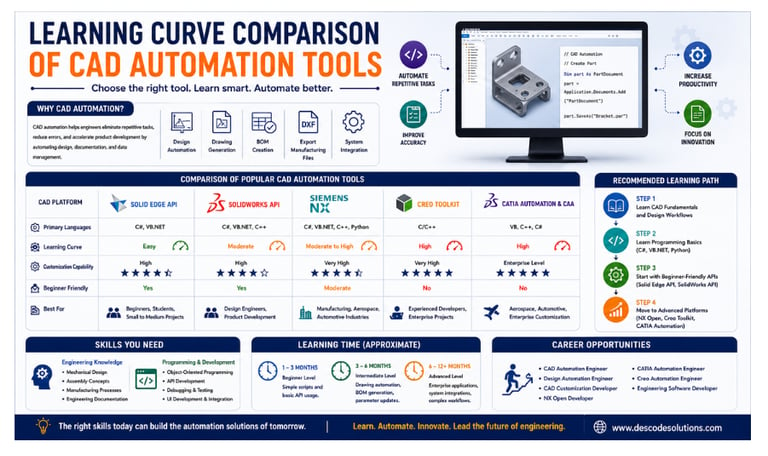
Solid Edge API – Easy to learn, uses C# and VB.NET, and is ideal for beginners.
SolidWorks API – Moderate learning curve, supports C#, VB.NET, and C++, and offers strong customization.
Siemens NX Open – More advanced, supports C#, VB.NET, C++, and Python, and provides very high customization.
Creo Toolkit – Difficult to learn, mainly uses C/C++, and is best for advanced automation projects.
CATIA Automation & CAA – Has a steep learning curve and offers enterprise-level customization for large and complex projects.
In simple terms: Start with Solid Edge API or SolidWorks API if you're a beginner. Move to NX Open, Creo Toolkit, or CATIA Automation as you gain more programming and automation experience.
Solid Edge API – Easiest Starting Point
Solid Edge API is often considered one of the best starting points for beginners.
Why It Is Easier to Learn
✔ Strong .NET integration
✔ Beginner-friendly programming languages
✔ Simple object model
✔ Easy Visual Studio integration
✔ Good documentation
Best For
Students
Beginners in CAD automation
Mechanical engineers learning programming
Small and medium automation projects
SolidWorks API – Beginner to Intermediate Level
SolidWorks API provides powerful customization capabilities while maintaining relatively easy accessibility.
Advantages
✔ Supports C#, VB.NET, and C++
✔ Large user community
✔ Extensive learning resources
✔ Suitable for automation and customization projects
Challenges
Requires understanding of object-oriented programming
Large API library can initially seem overwhelming
Best For
Mechanical designers
Automation beginners
Product development engineers
Siemens NX Open – Moderate to Advanced
NX Open is one of the most powerful CAD automation platforms available today.
Advantages
✔ Supports multiple programming languages
✔ Extensive automation capabilities
✔ Enterprise-level customization support
✔ Excellent integration possibilities
Challenges
Large API structure
Complex object hierarchy
Requires strong programming fundamentals
Best For
Manufacturing companies
Aerospace and automotive industries
Engineers pursuing advanced CAD automation careers
Creo Toolkit – Advanced Learning Curve
Creo Toolkit provides extremely powerful customization capabilities but has a steeper learning curve.
Advantages
✔ High performance
✔ Deep access to CAD functionality
✔ Enterprise-grade automation capabilities
Challenges
Primarily based on C/C++
Requires strong programming knowledge
More complex development environment
Best For
Experienced developers
Enterprise automation projects
Advanced CAD customization
CATIA Automation and CAA – Advanced Enterprise Platform
CATIA is widely used in aerospace and automotive industries for complex product development.
Advantages
✔ Extensive customization capabilities
✔ Enterprise integration support
✔ Powerful API framework
Challenges
Complex API architecture
Requires strong programming skills
Advanced development concepts
Longer learning period
Best For
Aerospace engineers
Automotive design teams
Enterprise customization developers
Which Tool Should Beginners Learn First?
For engineers who are new to automation, the following learning path is recommended:
Step 1
Learn CAD fundamentals and understand design workflows.
Step 2
Learn basic programming concepts.
Recommended languages:
C#
VB.NET
Python
Step 3
Start with beginner-friendly APIs:
Solid Edge API
SolidWorks API
Step 4
Move toward advanced platforms:
Siemens NX Open
Creo Toolkit
CATIA Automation and CAA
This approach helps engineers gradually build both programming and automation skills.
Skills Required to Learn CAD Automation
To become successful in CAD automation, engineers should develop skills in:
Engineering Knowledge
Mechanical design fundamentals
Assembly concepts
Manufacturing processes
Engineering documentation
Programming Skills
Object-oriented programming
Variables and data structures
Functions and classes
Error handling
File operations
Software Development Skills
API development
Debugging techniques
Database integration
User interface development
Version control
How Long Does It Take to Learn CAD Automation?
Approximate learning timelines:
Beginner Level: 1–3 months
Simple scripts and basic API usage.
Intermediate Level: 3–6 months
Drawing automation, parameter updates, BOM generation.
Advanced Level: 6–12 months or more
Enterprise applications, custom tools, system integrations, and complex workflows.
Regular practice and real-world projects significantly accelerate the learning process.
Career Opportunities
As industries increasingly adopt automation technologies, demand for skilled professionals continues to grow.
Popular career paths include:
CAD Automation Engineer
Design Automation Engineer
CAD Customization Developer
CATIA Automation Engineer
Creo Automation Engineer
Engineering Software Developer
Professionals who combine CAD expertise with programming skills are highly sought after in today's digital engineering landscape.
Conclusion
Every CAD automation platform offers unique strengths and learning challenges. Solid Edge API and SolidWorks API are excellent starting points for beginners, while Siemens NX Open, Creo Toolkit, and CATIA provide powerful enterprise-level capabilities for advanced users.
The best tool ultimately depends on your career goals, industry requirements, and willingness to develop both engineering and programming skills.
As digital engineering continues to evolve, learning CAD automation is becoming a valuable investment that can significantly enhance productivity and open exciting career opportunities.
Contact Us
💼 At Descode Solutions, we specialize in:
✔ CAD Automation Training
✔ CATIA, NX, Creo, SolidWorks & Solid Edge Automation
✔ Real-time Industry Projects
✔ CAD Customization & API Development
📈 Learn smarter. Automate faster. Accelerate your career in CAD automation.
📩 Looking to start your CAD automation journey? Connect with us today!
📞 Phone: +91 9544 123 321
🌐 www.descodesolutions.com
📧 info@descodesolutions.com
CAD Automation Training
Expert CAD Automation training for professionals and students
OUR COURSES
Contact
info@descodesolutions.com
(+91) 9544 123 321
Copyright © 2026 Descode Solutions LLP
NX Customization
CATIA Customization
AutoCAD Customization
Solidworks Customization
Solid Edge Customization
Revit Customization
Inventor Customization
Creo Customization