How to Start a Career in CAD Automation (Step-by-Step Roadmap)
CAD automation is becoming one of the most in-demand skills in modern engineering. Industries are actively looking for engineers who can combine design knowledge with programming skills to automate workflows, improve productivity, and build smarter engineering solutions.
5/18/20262 min read
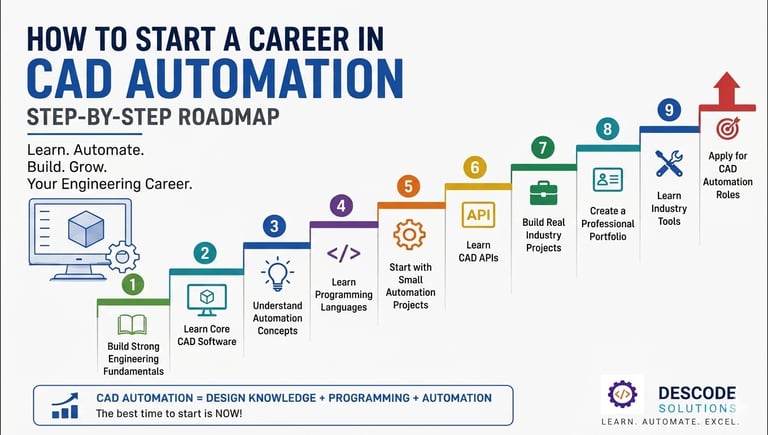
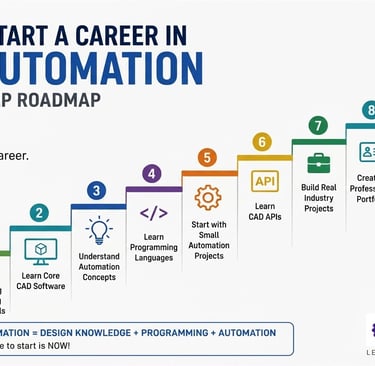
If you are a student, fresher, or working professional wondering how to start a career in CAD automation, this step-by-step roadmap will guide you in the right direction.
Overview
Traditional CAD skills are still important, but industries today need engineers who can do more than just design. Companies now prefer professionals who can automate repetitive design tasks, create custom tools, and improve engineering efficiency using APIs and programming.
This creates excellent career opportunities in automotive, aerospace, industrial machinery, manufacturing, product development, and software engineering.
So how do you begin? Let’s break it down step by step.
Step 1: Build Strong Engineering Fundamentals
Before entering CAD automation, you need a solid foundation in engineering concepts.
Focus on understanding:
Mechanical design principles
Manufacturing processes
Engineering drawings
GD&T basics
Product development workflows
A strong engineering base helps you understand where automation creates real value.
Step 2: Learn Core CAD Software
The next step is mastering at least one major CAD platform.
Popular CAD software includes:
CATIA
Siemens NX
SolidWorks
Creo
Solid Edge
Start by learning:
✔ Part modeling
✔ Assembly design
✔ Drafting
✔ Parametric modeling
✔ Design modifications
Without CAD knowledge, automation becomes difficult to apply effectively.
Step 3: Understand Automation Concepts
Once you're comfortable with CAD software, start learning automation basics.
Understand concepts like:
Macros
APIs
Object models
Parameters
Event handling
Workflow automation
This is where you move from being a CAD user to an automation engineer.
Step 4: Learn Programming Languages
Programming is the backbone of CAD automation.
Start with beginner-friendly languages:
C#
Most widely used for enterprise CAD customization.
VB.NET / VBA
Great for beginners starting with macros.
Python
Easy to learn and powerful for automation.
C++
Useful for advanced customization projects.
Focus on learning:
✔ Variables
✔ Loops
✔ Conditions
✔ Functions
✔ Classes and Objects
Step 5: Start with Small Automation Projects
Practice by automating simple tasks such as:
Auto-renaming files
Creating standard parts
Exporting drawings
Updating parameters
Generating reports
Small projects build confidence and real-world problem-solving skills.
Step 6: Learn CAD APIs
Now move into platform-specific APIs.
Examples include:
NX Open API
CATIA Automation API
Solid Edge API
Creo Toolkit
APIs allow you to create professional custom engineering tools.
Step 7: Build Real Industry Projects
Real projects make your profile stronger.
Examples:
✔ Automated part generation
✔ BOM extraction tools
✔ Assembly automation
✔ Drawing automation
✔ Design validation tools
This helps you gain practical experience that companies value.
Step 8: Create a Professional Portfolio
Document your projects clearly.
Include:
Project screenshots
Source code
Problem statement
Solution approach
Results achieved
A strong portfolio can make you stand out during interviews.
Step 9: Learn Industry Tools
To become job-ready, also learn:
Git for version control
SQL for database integration
Basic web technologies (HTML, CSS, JavaScript)
Cloud basics (Azure or AWS)
These skills are highly valuable in enterprise automation roles.
Step 10: Apply for CAD Automation Roles
Once you have skills and projects, target roles like:
CAD Automation Engineer
NX Customization Engineer
CATIA Developer
CAD API Developer
Technical Software Engineer
Industries across India and globally are actively hiring in this field.
Career Growth in CAD Automation
With the right skills, you can grow into roles such as:
Senior Automation Engineer
CAD Customization Specialist
Technical Lead
Engineering Software Developer
Automation Consultant
The career path offers excellent salary growth and global opportunities.
Final Thoughts
CAD automation is not just a technical skill—it is a future-proof career path. Engineers who combine design knowledge with programming and automation expertise will have a major advantage in the coming years.
The best time to start is now.
Contact Us
💼 At Descode Solutions, we specialize in:
✔ CATIA & NX Automation Training
✔ Real-time Industry Projects
✔ CAD Customization & API Development
📈 Learn smarter. Automate faster. Accelerate your career in CAD automation.
📩 Ready to start your CAD automation journey? Connect with us today!
📞 Phone: +91 9544 123 321
🌐 www.descodesolutions.com
📧 info@descodesolutions.com
CAD Automation Training
Expert CAD Automation training for professionals and students
OUR COURSES
Contact
info@descodesolutions.com
(+91) 9544 123 321
Copyright © 2026 Descode Solutions LLP
NX Customization
CATIA Customization
AutoCAD Customization
Solidworks Customization
Solid Edge Customization
Revit Customization
Inventor Customization
Creo Customization