
Introduction to NX Open API
Learn the fundamentals of NX Open API and discover how it helps engineers automate tasks, customize workflows, and improve productivity in Siemens NX. This beginner-friendly guide explains the basics of NX Open API and why it is important in modern CAD automation.
5/28/20263 min read
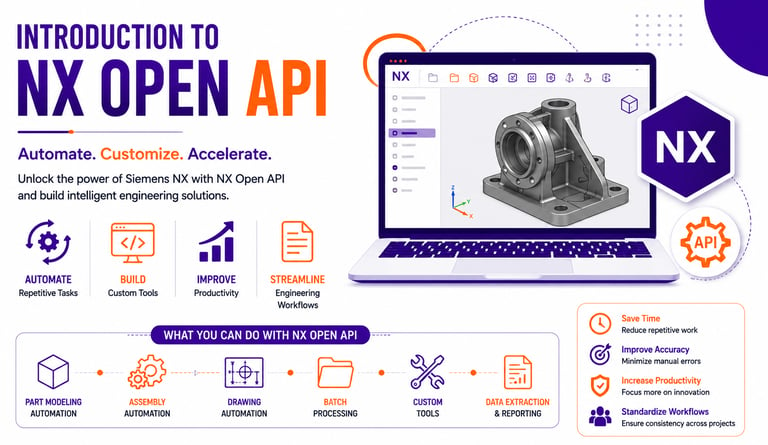
Overview
In today’s engineering industry, automation is becoming an essential part of product design and development. Companies are looking for faster workflows, reduced manual work, and improved engineering efficiency.
This is where NX Open API plays an important role.
NX Open API allows engineers and developers to automate tasks inside Siemens NX, create custom engineering tools, and build intelligent design workflows.
For students and professionals interested in CAD automation, learning NX Open API can open the door to exciting career opportunities in design automation and engineering software development.
What is NX Open API?
NX Open API is the programming interface provided by Siemens NX that allows developers to interact with NX software using programming languages.
Using NX Open API, engineers can:
✔ Automate repetitive tasks
✔ Create custom commands and tools
✔ Generate models automatically
✔ Extract engineering data
✔ Improve workflow efficiency
✔ Integrate NX with other software systems
Instead of performing every task manually, engineers can build automation solutions that save time and improve productivity.
Why is NX Open API Important?
Modern engineering projects often involve:
Large assemblies
Repetitive design modifications
Multiple configurations
Complex workflows
Time-consuming documentation
Manual processes can slow down projects and increase the risk of errors.
NX Open API helps companies solve these challenges through automation and customization.
Programming Languages Used in NX Open API
NX Open supports multiple programming languages, including:
C#
Most commonly used for enterprise-level NX automation projects.
VB.NET
Popular for beginner and intermediate customization tasks.
Python
Easy to learn and widely used for scripting and automation.
C++
Used for advanced and high-performance applications.
This flexibility allows developers to choose a language based on project requirements.
What Can You Do with NX Open API?
NX Open API can automate many engineering tasks.
1. Part Modeling Automation
Automatically create 3D models using predefined parameters and rules.
Example:
Generate standard mechanical components automatically.
2. Assembly Automation
Automate large assembly management tasks such as:
✔ Component placement
✔ Constraint creation
✔ Assembly updates
3. Drawing Automation
Generate engineering drawings automatically, including:
Standard views
Dimensions
BOM tables
Annotations
This reduces manual drafting work significantly.
4. Batch Processing
NX Open API can process multiple files automatically.
Examples include:
Batch PDF export
Mass property extraction
File renaming
Data validation
5. Custom Engineering Tools
Companies can develop custom applications tailored to their workflows.
Examples:
✔ Design validation tools
✔ Configuration management systems
✔ Reporting tools
✔ Manufacturing support tools
Key Advantages of NX Open API
Faster Design Process
Automation reduces repetitive manual work.
Improved Accuracy
Minimizes human errors in design workflows.
Better Productivity
Engineers can focus more on innovation and problem-solving.
Workflow Standardization
Ensures consistency across projects.
Time Savings
Large engineering tasks can be completed much faster.
Industries Using NX Open API
NX Open API is widely used in industries such as:
Automotive
Aerospace
Industrial Machinery
Manufacturing
Product Design
Heavy Engineering
Companies use automation to manage complex engineering projects efficiently.
How to Start Learning NX Open API
Step 1: Learn Siemens NX Basics
Understand modeling, assemblies, and drafting workflows.
Step 2: Learn Programming Basics
Start with C#, VB.NET, or Python.
Step 3: Explore NX Open Documentation
Understand object models and API structures.
Step 4: Create Small Projects
Start automating simple tasks like exports and model creation.
Step 5: Build Advanced Applications
Move toward professional customization and enterprise automation.
Career Opportunities in NX Automation
Engineers with NX Open API skills are highly in demand.
Popular roles include:
NX Automation Engineer
Design Automation Engineer
NX API Developer
Engineering Software Developer
With industries rapidly adopting automation, career opportunities continue to grow.
Future of NX Automation
The future of engineering is moving toward:
✔ Smart automation
✔ AI-assisted design
✔ Digital manufacturing
✔ Intelligent CAD systems
✔ Cloud-based engineering workflows
NX Open API will continue to play a major role in next-generation engineering solutions.
Conclusion
NX Open API is a powerful technology that helps engineers automate workflows, improve productivity, and build custom engineering solutions inside Siemens NX.
Whether you are a student, fresher, or working professional, learning NX Open API can help you build valuable skills for the future of engineering automation.
Contact Us
💼 At Descode Solutions, we specialize in:
✔ CATIA & NX Automation Training
✔ Real-time Industry Projects
✔ CAD Customization & API Development
📈 Learn smarter. Automate faster. Accelerate your career in CAD automation.
📩 Looking to learn NX automation and API development? Connect with us today!
📞 Phone: +91 9544 123 321
🌐 www.descodesolutions.com
📧 info@descodesolutions.com
CAD Automation Training
Expert CAD Automation training for professionals and students
OUR COURSES
Contact
info@descodesolutions.com
(+91) 9544 123 321
Copyright © 2026 Descode Solutions LLP
NX Customization
CATIA Customization
AutoCAD Customization
Solidworks Customization
Solid Edge Customization
Revit Customization
Inventor Customization
Creo Customization

