
VBA vs C# for SolidWorks Automation: Which is Better?
Confused between VBA and C# for SolidWorks automation? This guide explains the differences, advantages, and best use cases to help you choose the right language for your learning and career.
4/23/20262 min read
Overview
SolidWorks automation is a powerful way to improve productivity, reduce repetitive work, and build smart design solutions. Two of the most commonly used programming options are VBA (Visual Basic for Applications) and C# (.NET).
For students and beginners, choosing between these two can be confusing. Each has its own strengths, learning curve, and purpose. This blog will help you understand both clearly and decide which one is better for you.
What is VBA in SolidWorks?
VBA is a beginner-friendly scripting language built into SolidWorks. It is mainly used for creating macros that automate simple and repetitive tasks.
Key Features of VBA:
Easy to learn and use
No complex setup required
Works directly inside SolidWorks
Ideal for quick automation tasks
Common Use Cases:
Automating part modeling steps
Updating dimensions and parameters
Batch file operations
Recording and modifying macros
👉 VBA is perfect for students who are just starting with automation.
What is C# in SolidWorks Automation?
C# is a modern programming language used with the SolidWorks API for building advanced automation tools and applications.
Key Features of C#:
Object-oriented and powerful
Supports .NET framework
Suitable for large and complex projects
Allows custom UI and application development
Common Use Cases:
Building standalone automation tools
Creating custom user interfaces
Developing scalable engineering applications
Integrating SolidWorks with other systems
👉 C# is ideal for advanced users and professional-level development.
Key Differences Between VBA and C#
Learning Curve
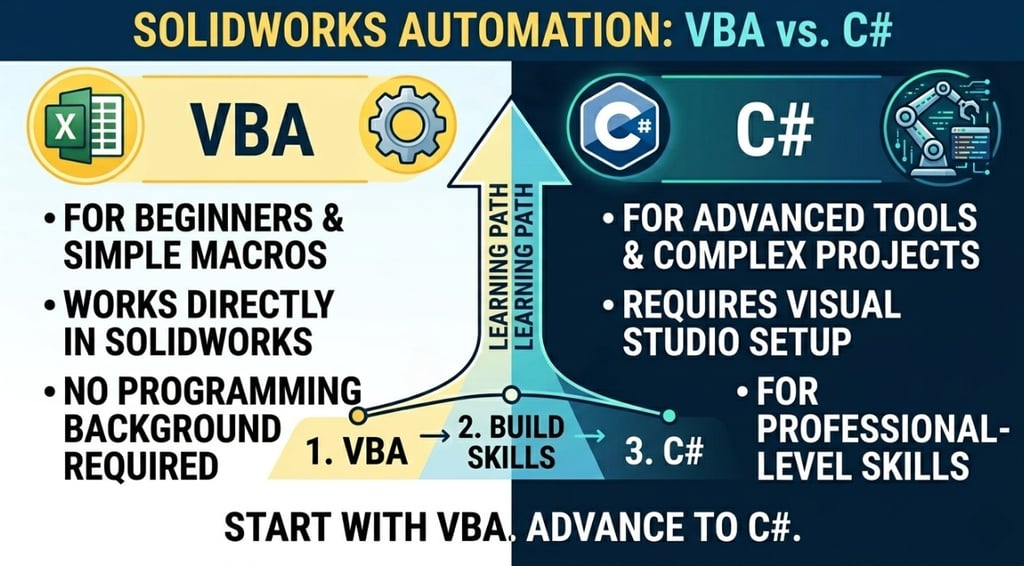
VBA is easy and beginner-friendly, while C# requires programming knowledge and practice.
Setup and Development
VBA works inside SolidWorks with minimal setup. C# requires Visual Studio and API configuration.
Capability
VBA is limited to basic automation, whereas C# can handle complex, large-scale solutions.
Performance
C# is faster and more efficient, especially for large projects.
Flexibility
C# provides more flexibility for customization and integration compared to VBA.
Which One Should You Learn First?
Start with VBA if:
✔ You are a beginner
✔ You want quick results
✔ You have no programming background
Choose C# if:
✔ You want to build advanced tools
✔ You aim for professional automation roles
✔ You are comfortable with programming concepts
Recommended Learning Path
For most students, the best approach is:
👉 Start with VBA macros to understand automation basics
👉 Practice small tasks and build confidence
👉 Move to C# for advanced development and real-world projects
This step-by-step approach ensures strong fundamentals and long-term growth.
Conclusion
Both VBA and C# are important for SolidWorks automation, but they serve different purposes. VBA is the perfect starting point, while C# opens the door to advanced and professional-level automation.
Instead of choosing one over the other, focus on learning them in the right order. This will help you build strong skills and create better career opportunities in CAD automation.
Contact Us
💼 At Descode Solutions, we specialize in:
✔ CATIA & NX Automation Training
✔ Real-time Industry Projects
✔ CAD Customization & API Development
📈 Learn smarter. Automate faster. Accelerate your career in CAD automation.
📩 Looking to upgrade your skills or choose the right automation path? Connect with us today!
📞 Phone: +91 9544 123 321
🌐 www.descodesolutions.com
📧 info@descodesolutions.com
CAD Automation Training
Expert CAD Automation training for professionals and students
OUR COURSES
Contact
info@descodesolutions.com
(+91) 9544 123 321
Copyright © 2026 Descode Solutions LLP
NX Customization
CATIA Customization
AutoCAD Customization
Solidworks Customization
Solid Edge Customization
Revit Customization
Inventor Customization
Creo Customization