
Use Cases of NX Automation in Aerospace Engineering
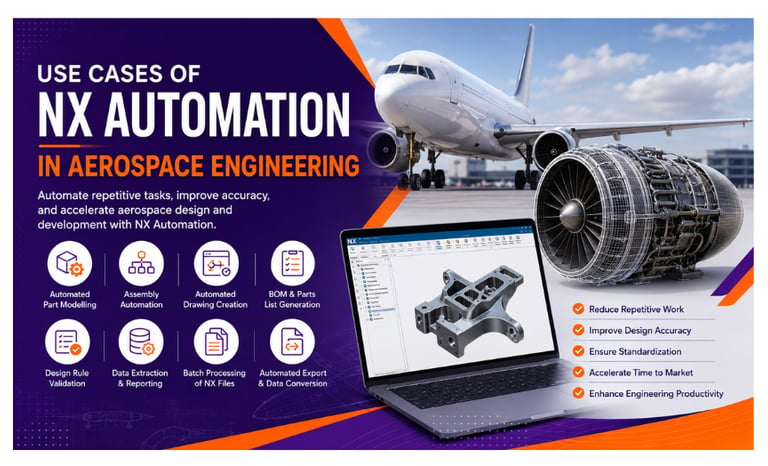
Discover the top 10 use cases of NX Automation in aerospace engineering, from automated part modelling and assembly management to drawing creation, BOM generation, design validation, CAD data extraction, and batch processing. Learn how NX Open, UFUNC, C#, C++, and Python can help aerospace companies reduce repetitive work, improve design accuracy, standardise engineering workflows, and increase productivity.
7/27/20265 min read
Introduction
Aerospace engineering involves complex designs, large assemblies, strict engineering standards, and highly detailed documentation. Engineers often spend significant time performing repetitive CAD tasks that can slow down product development and increase the risk of manual errors.
This is where NX Automation can make a significant difference.
Using technologies such as NX Open, UFUNC, C#, C++, and Python, aerospace companies can automate repetitive engineering workflows, improve design consistency, reduce manual effort, and accelerate product development.
In this blog, we explore the top 10 use cases of NX Automation in Aerospace Engineering.
What Is NX Automation?
NX Automation is the process of using programming languages, APIs, and custom software tools to automate tasks within Siemens NX.
With NX Automation, engineers and developers can create solutions for:
Part modelling
Assembly management
Drawing creation
Design validation
BOM generation
Data extraction
Batch processing
File conversion
Engineering documentation
Instead of performing repetitive operations manually, custom automation tools can execute predefined tasks automatically based on engineering rules and requirements.
Top 10 Use Cases of NX Automation in Aerospace Engineering
1. Automated Aerospace Part Modelling
Aerospace components often contain standardised features and design patterns.
Examples include:
Brackets
Fittings
Mounting components
Structural parts
Panels
Frames
Connectors
When similar components need to be created repeatedly, NX Automation can significantly reduce modelling time.
A custom automation tool can automatically:
✔ Create standard features
✔ Apply predefined dimensions
✔ Generate holes and patterns
✔ Add fillets and chamfers
✔ Apply design parameters
✔ Create geometry based on user inputs
Instead of manually creating every feature, engineers can enter the required parameters and allow the automation tool to generate the model.
This helps improve modelling speed and design consistency.
2. Automated Feature Creation
Many aerospace components contain repetitive geometric features such as:
Holes
Slots
Cutouts
Patterns
Fillets
Chamfers
Reference geometry
NX Automation can create these features automatically based on predefined engineering rules.
For example, an automated tool can generate a standard hole pattern based on:
Hole diameter
Number of holes
Spacing requirements
Component type
Design standards
This reduces repetitive manual operations and helps engineers create standardised aerospace components more efficiently.
3. Aerospace Assembly Automation
Aerospace assemblies can contain thousands of components, making manual assembly management time-consuming.
NX Automation can help engineers automate tasks such as:
✔ Inserting standard components
✔ Positioning parts
✔ Applying assembly constraints
✔ Replacing components
✔ Updating component references
✔ Validating assembly relationships
For example, a custom NX automation tool can automatically insert standard aerospace components and apply predefined assembly constraints.
This can save significant engineering time when working with large and complex assemblies.
4. Automated Design Configuration
Aerospace products often require multiple design variants based on:
Aircraft models
Customer requirements
Structural configurations
Weight requirements
Manufacturing requirements
Creating each design configuration manually can be time-consuming.
NX Automation can generate different design variants based on predefined parameters.
Engineers can enter values such as:
Length
Width
Thickness
Hole locations
Component options
The automation tool can then automatically generate the required design configuration.
This makes it easier to create customised aerospace components while maintaining design consistency.
5. Automated Drawing Creation
Engineering drawings are essential for aerospace manufacturing and documentation.
However, creating drawings manually can involve repetitive tasks such as:
Creating drawing views
Adding dimensions
Creating section views
Adding annotations
Applying title blocks
Generating parts lists
NX Automation can help automate these drafting activities.
Automated drawing workflows can:
✔ Create standard drawing views
✔ Apply predefined templates
✔ Add standard annotations
✔ Generate title block information
✔ Extract model data
✔ Create parts lists
✔ Export drawings in required formats
This helps engineering teams create consistent and standardised aerospace documentation.
6. Automated BOM and Parts List Generation
Aerospace assemblies can contain a large number of components.
Manually creating and updating Bills of Materials can result in:
❌ Data entry errors
❌ Missing components
❌ Incorrect quantities
❌ Inconsistent information
NX Automation can automatically extract information such as:
Part numbers
Component names
Quantities
Material information
Revision details
This data can then be used to generate accurate BOMs and parts lists.
Automated BOM generation improves data accuracy and reduces the time required for engineering documentation.
7. Automated Design Rule Checking
Aerospace engineering requires strict adherence to design standards and engineering requirements.
NX Automation can be used to develop automated design validation tools.
These tools can check:
✔ Minimum wall thickness
✔ Hole diameter requirements
✔ Feature spacing
✔ Naming conventions
✔ Material information
✔ Design parameters
✔ Engineering standards
If a design does not meet the required criteria, the automation tool can identify the issue and notify the engineer.
This helps detect design problems earlier in the development process.
8. Automated CAD Data Extraction
Aerospace companies often need to extract information from large numbers of CAD models.
Manually collecting this information can be inefficient.
NX Automation can automatically extract:
Part properties
Feature information
Dimensions
Attributes
Material details
Assembly structures
Component relationships
The extracted data can be used for:
Engineering reports
Manufacturing systems
PLM systems
ERP systems
Quality documentation
This helps improve connectivity between CAD systems and other engineering platforms.
9. Batch Processing of NX Files
Aerospace organisations often manage thousands of CAD files.
Performing the same operation manually on every file can consume a significant amount of engineering time.
NX Automation can be used to process multiple files automatically.
Common batch processing tasks include:
✔ Updating attributes
✔ Renaming components
✔ Extracting CAD data
✔ Updating parameters
✔ Validating models
✔ Exporting files
✔ Generating reports
Batch processing allows engineering teams to manage large volumes of CAD data more efficiently.
10. Automated File Export and Data Conversion
Aerospace engineering workflows often require CAD data in multiple formats.
NX Automation can help automate the export of files to formats such as:
STEP
IGES
JT
Parasolid
PDF
DXF
Automated export tools can also apply predefined rules for:
File naming
Output locations
Export settings
File formats
This reduces repetitive manual file processing and improves data management.
Manual NX Workflow vs Automated NX Workflow
Manual Workflow
An engineer may need to:
Open each NX file
Check the model
Update attributes
Extract information
Export the file
Save the output manually
Repeat the process for every file
For a large number of files, this process can take considerable time.
Automated Workflow
An NX automation tool can:
Read multiple NX files
Validate the models
Update required attributes
Extract engineering information
Export files automatically
Generate reports
Save the output in predefined locations
This significantly reduces repetitive manual work and improves process consistency.
Technologies Used for NX Automation
Several programming technologies can be used to develop NX automation solutions.
NX Open
NX Open is a powerful API used to customise and automate Siemens NX.
It allows developers to interact with:
Parts
Features
Assemblies
Drawings
Attributes
Expressions
UFUNC
UFUNC provides access to powerful NX functions and is used for advanced customisation and automation requirements.
C#
C# is widely used for developing:
Custom NX applications
Engineering utilities
Automation tools
User interfaces
Integration solutions
C++
C++ can be used for advanced NX customisation and high-performance engineering applications.
Python
Python can support:
CAD scripting
Data extraction
File processing
Workflow automation
Benefits of NX Automation in Aerospace Engineering
Reduce Repetitive Work
Automation reduces the amount of time engineers spend on repetitive CAD operations.
Improve Design Consistency
Predefined automation rules help standardise engineering workflows.
Reduce Manual Errors
Automated processes reduce repetitive data entry and manual operations.
Improve Productivity
Engineers can focus more on complex design and engineering tasks.
Accelerate Product Development
Faster design and documentation workflows can help reduce development time.
Improve Data Accuracy
Automated data extraction and validation improve the quality of engineering information.
Why Aerospace Companies Need NX Automation
Aerospace engineering projects often involve:
Large product structures
Complex assemblies
Multiple design configurations
Strict engineering standards
Large amounts of CAD data
Extensive documentation
As the complexity of aerospace products continues to increase, manual processes become increasingly difficult to scale.
NX Automation provides a way to transform repetitive engineering tasks into intelligent, standardised workflows.
The Future of NX Automation in Aerospace
The future of aerospace engineering is moving towards more connected and intelligent digital engineering workflows.
NX Automation can support emerging technologies and processes such as:
Model-Based Definition
Digital Twins
Generative Design
AI-assisted Engineering
PLM Integration
Automated Design Validation
As aerospace companies continue to adopt digital engineering technologies, CAD automation and NX customisation will become increasingly important.
Conclusion
NX Automation offers significant opportunities for improving aerospace engineering workflows.
From automated part modelling and assembly management to drawing creation, BOM generation, design validation, data extraction, and batch processing, automation can reduce repetitive work and improve engineering productivity.
By using technologies such as NX Open, UFUNC, C#, C++, and Python, organisations can develop custom automation solutions that meet their specific engineering requirements.
The result is a more efficient and standardised engineering workflow with:
✔ Faster design processes
✔ Reduced repetitive work
✔ Improved data accuracy
✔ Better engineering standardisation
✔ Fewer manual errors
✔ Higher productivity
👉 Ready to explore NX Automation?
Connect with Descode Solutions and take the next step towards smarter engineering workflows.
At Descode Solutions, we help engineers and organisations explore the possibilities of NX Automation, NX Customization, and CAD API Development.
Whether you want to automate repetitive NX tasks, develop custom engineering applications, or build your career in NX Automation, the right skills and automation strategy can transform the way engineering teams work.
📞 Phone: +91 9544 123 321
🌐 Learn more: https://descodesolutions.com/
📩 Contact us: info@descodesolutions.com
CAD Automation Training
Expert CAD Automation training for professionals and students
OUR COURSES
Contact
info@descodesolutions.com
(+91) 9544 123 321
Copyright © 2026 Descode Solutions LLP
NX Customization
CATIA Customization
AutoCAD Customization
Solidworks Customization
Solid Edge Customization
Revit Customization
Inventor Customization
Creo Customization

