
Top 10 Repetitive Tasks You Can Automate in CATIA
Discover the top 10 repetitive tasks that can be automated in CATIA using CATIA Automation, CATIA Macros, and CAA development. From part modeling and drawing creation to data extraction and batch processing, CAD automation helps engineers save time, reduce errors, and improve design productivity.
7/23/20265 min read
Introduction
CATIA is widely used in industries such as aerospace, automotive, manufacturing, and product development. Engineers use CATIA to create complex parts, assemblies, surfaces, and engineering drawings.
However, many CAD workflows include repetitive tasks that are performed again and again. Manually completing these tasks can consume valuable engineering time and increase the possibility of errors.
This is where CATIA Automation can make a significant difference.
Using CATIA Macros, CATIA Automation APIs, and CAA development, engineers can automate repetitive processes, standardize workflows, and create custom tools that improve productivity.
In this blog, we will explore the top 10 repetitive tasks that can be automated in CATIA.
What Is CATIA Automation?
CATIA Automation is the process of using programming and APIs to control CATIA and automate design-related tasks.
Common technologies used for CATIA automation include:
VBA
VBScript
C#
C++
CATIA Automation API
CAA RADE
Automation allows engineers to interact with CATIA objects such as:
Parts
Assemblies
Sketches
Features
Parameters
Drawings
Surfaces
Product structures
Instead of manually performing the same operation repeatedly, engineers can execute the task automatically using a macro or custom application.
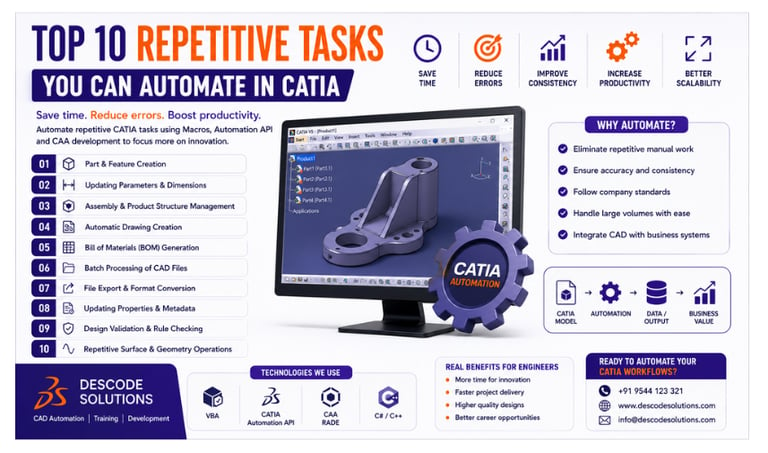
Top 10 Repetitive Tasks You Can Automate in CATIA
1. Part and Feature Creation
Creating similar parts or features repeatedly can take significant time.
CATIA automation can be used to automatically:
Create new parts
Generate sketches
Create pads and pockets
Create holes
Apply patterns
Update feature parameters
For example, if a company produces similar components with different dimensions, an automation tool can create the required part based on user inputs.
This reduces manual modeling time and improves consistency.
2. Updating Parameters and Dimensions
Engineers often need to modify the same parameters across multiple CATIA models.
Automation can update:
Length
Width
Height
Thickness
Hole diameter
Material properties
Design parameters
Instead of manually opening each model and changing values, a CATIA macro can update the required parameters automatically.
This is especially useful for configurable products and product families.
3. Assembly and Product Structure Management
Large assemblies may contain hundreds or thousands of components.
Managing these components manually can be time-consuming.
CATIA automation can help with:
Creating product structures
Inserting components
Replacing components
Updating component references
Renaming components
Managing assembly relationships
Automated assembly workflows help engineers maintain organized and consistent product structures.
4. Automatic Drawing Creation
Creating engineering drawings is another repetitive task that can be automated.
CATIA automation can help generate:
New drawing documents
Standard views
Section views
Detail views
Dimensions
Annotations
Title blocks
Standard drawing templates can also be applied automatically to ensure that all drawings follow company standards.
This reduces the time required for manual drafting and documentation.
5. Bill of Materials (BOM) Generation
For large assemblies, manually preparing a Bill of Materials can be difficult and time-consuming.
Automation can extract information such as:
Part numbers
Component names
Quantities
Materials
Descriptions
Revision information
This data can be automatically exported to Excel, databases, ERP systems, or other business applications.
Automated BOM generation improves accuracy and reduces manual data entry.
6. Batch Processing of CAD Files
Many companies need to process large numbers of CATIA files.
For example, engineers may need to:
Update parameters
Change properties
Export files
Rename documents
Convert file formats
Update metadata
Performing these tasks manually for hundreds of files is inefficient.
With CATIA automation, a single application can process multiple files automatically.
This is known as batch processing.
7. File Export and Format Conversion
Engineering teams often need to export CATIA files into different formats.
Common formats include:
STEP
IGES
STL
DXF
DWG
PDF
A CATIA macro can automatically open the required files and export them into the selected format.
This is particularly useful for manufacturing, supplier communication, and data exchange.
8. Updating Custom Properties and Metadata
Maintaining accurate product data is important for engineering and manufacturing organizations.
CATIA automation can automatically update:
Part numbers
Product names
Material information
Revision details
Designer information
Project codes
This ensures that important metadata remains consistent across multiple models and assemblies.
Automated property management also improves data quality for PLM and ERP integration.
9. Design Validation and Rule Checking
Manual design validation can take significant time, especially in complex projects.
Automation can check whether models meet predefined design rules.
For example, a custom CATIA application can verify:
Minimum thickness
Required dimensions
Naming conventions
Missing parameters
Incorrect materials
Design standards
Automated validation helps identify problems earlier in the design process and improves overall design quality.
10. Repetitive Surface and Geometry Operations
Complex surface modeling often involves repeated operations.
CATIA automation can assist with:
Creating reference geometry
Generating curves
Creating surfaces
Applying transformations
Creating patterns
Updating geometric parameters
For organizations working with complex automotive or aerospace surfaces, automation can significantly reduce repetitive modeling effort.
Benefits of Automating Repetitive CATIA Tasks
Automating repetitive CATIA tasks provides several important advantages.
Save Time
Automation can complete repetitive operations much faster than manual processes.
Reduce Human Errors
Predefined automation workflows help reduce mistakes caused by repetitive manual operations.
Improve Consistency
Automated processes ensure that tasks are completed according to defined company standards.
Increase Productivity
Engineers can spend more time on complex design and engineering decisions.
Improve Scalability
Automation makes it easier to process large numbers of models, drawings, and engineering files.
Support Business Integration
CATIA automation can connect CAD workflows with systems such as:
PLM
ERP
Databases
Manufacturing systems
CATIA Automation Technologies
Different technologies can be used depending on the complexity of the automation project.
CATIA Macros
Macros are useful for simple and repetitive tasks.
They are commonly developed using:
VBA
VBScript
CATIA Automation API
The CATIA Automation API allows developers to control CATIA objects and automate design processes using programming.
CAA RADE
CAA RADE is used for advanced CATIA customization and enterprise-level application development.
It is suitable for complex applications that require deep integration with CATIA.
Example: Manual vs Automated Workflow
Imagine an engineering team that needs to update the properties of 500 CATIA components.
Manual Process
Engineers must:
Open each file
Locate the required properties
Update the information
Save the file
Repeat the process
This can take many hours.
Automated Process
A CATIA automation application can:
✔ Open the required files
✔ Update the properties automatically
✔ Validate the information
✔ Save the files
✔ Generate a completion report
The same task can be completed much faster with reduced manual effort.
Best Practices for CATIA Automation
To create reliable automation solutions, follow these best practices:
Start with simple repetitive tasks.
Clearly define the automation workflow.
Use reusable and modular code.
Include proper error handling.
Validate input data before processing.
Follow company naming standards.
Test automation with different models.
Maintain proper documentation.
Use version control for automation projects.
Good planning and development practices help create reliable and scalable CATIA automation tools.
Industries Using CATIA Automation
CATIA automation is widely used in:
Automotive
Aerospace
Defense
Industrial Equipment
Manufacturing
Consumer Products
Shipbuilding
These industries use automation to improve design efficiency, reduce development time, and manage complex engineering processes.
The Future of CATIA Automation
The future of CATIA automation is moving toward more intelligent and connected engineering workflows.
Emerging technologies include:
Artificial Intelligence
Generative Design
Digital Twins
Model-Based Engineering
PLM Integration
Cloud-Based Engineering
Smart Manufacturing
As engineering workflows become more complex, automation will continue to play an important role in improving productivity and design quality.
Conclusion
CATIA automation provides a powerful way to eliminate repetitive engineering tasks and improve CAD productivity.
From creating parts and updating parameters to generating drawings, processing files, managing assemblies, and validating designs, many daily CATIA tasks can be automated using CATIA Macros, CATIA Automation APIs, and CAA development.
By automating repetitive work, engineers can save time, reduce errors, improve consistency, and focus more on innovation and complex engineering challenges.
For companies working with large-scale CATIA workflows, investing in CAD automation can provide long-term productivity and efficiency benefits.
Contact Us
💼 At Descode Solutions, we specialize in:
✔ CATIA Automation Training
✔ CATIA Customization Training
✔ CATIA CAA Development
✔ CATIA Macro Development
✔ CAD Automation & API Development
✔ Real-time Industry Projects
📈 Learn smarter. Automate faster. Accelerate your career in CAD automation.
📩 Looking to improve your CATIA automation skills or automate your engineering workflows? Connect with us today!
📞 Phone: +91 9544 123 321 🌐 www.descodesolutions.com
📧 info@descodesolutions.com
CAD Automation Training
Expert CAD Automation training for professionals and students
OUR COURSES
Contact
info@descodesolutions.com
(+91) 9544 123 321
Copyright © 2026 Descode Solutions LLP
NX Customization
CATIA Customization
AutoCAD Customization
Solidworks Customization
Solid Edge Customization
Revit Customization
Inventor Customization
Creo Customization

