
Automating Part Modeling in Creo Using Pro/Toolkit
Learn how to automate part modeling in Creo using Pro/Toolkit. This guide explains the fundamentals of Pro/Toolkit, its benefits, workflow, real-world applications, and best practices for building powerful CAD automation solutions.
7/6/20263 min read
Introduction
In today's competitive manufacturing industry, companies are under constant pressure to deliver high-quality products faster while reducing engineering costs. Mechanical engineers often spend a significant amount of time creating similar parts, updating dimensions, generating multiple design variants, and maintaining engineering documentation.
These repetitive tasks can slow product development and increase the risk of manual errors.
The Creo Pro/Toolkit provides a powerful solution by enabling engineers to automate part modeling and customize Creo Parametric to meet specific business requirements.
With Pro/Toolkit, organizations can create intelligent applications that automatically generate parts, update models, apply company standards, and streamline engineering workflows.
What is Creo Pro/Toolkit?
Creo Pro/Toolkit is the native C/C++ programming interface provided by PTC for customizing and automating Creo Parametric.
Unlike simple macros, Pro/Toolkit provides direct access to Creo's internal functionality, allowing developers to create robust applications that integrate seamlessly with the CAD environment.
Using Pro/Toolkit, engineers can:
Create parts automatically
Modify existing models
Control features and parameters
Build custom user interfaces
Automate assemblies and drawings
Integrate Creo with ERP and PLM systems
It is widely used in industries such as automotive, aerospace, industrial machinery, and manufacturing.
Why Automate Part Modeling?
Manual part modeling can be repetitive, especially when designing families of similar components.
For example:
Brackets
Mounting plates
Shafts
Flanges
Covers
Structural components
Instead of creating each model individually, automation allows engineers to generate multiple parts automatically based on predefined parameters.
Benefits of Automating Part Modeling
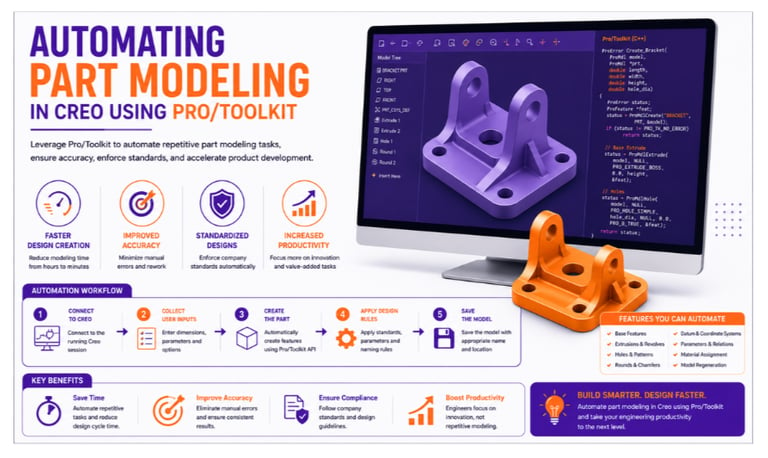
Faster Design Creation
Automation significantly reduces the time required to create new parts by generating models automatically from predefined rules and dimensions.
Improved Accuracy
Automated modeling minimizes manual errors and ensures that every part follows the same engineering standards.
Standardized Designs
Organizations can enforce company design rules, naming conventions, and feature structures consistently across all projects.
Easy Design Modifications
Changing a few parameters automatically updates the entire model, eliminating the need for manual redesign.
Increased Productivity
Engineers spend less time on repetitive modeling tasks and more time solving complex design challenges.
How Pro/Toolkit Automates Part Modeling
A typical automation workflow includes:
Step 1: Connect to Creo
The Pro/Toolkit application connects to a running Creo Parametric session.
Step 2: Collect User Inputs
The application gathers values such as:
Length
Width
Height
Hole diameter
Material
Feature options
Step 3: Create the Part
Using Creo API functions, the application automatically creates the base model and required features.
Step 4: Apply Design Rules
Standard dimensions, tolerances, naming conventions, and company templates are applied automatically.
Step 5: Save the Model
The completed model is saved with the appropriate file name and project location.
Features That Can Be Automated
Pro/Toolkit supports automation of many modeling operations, including:
Base feature creation
Extrusions and revolves
Holes and patterns
Rounds and chamfers
Datum planes and coordinate systems
Parameters and relations
Material assignment
Model regeneration
File management
These capabilities allow developers to build highly customized engineering applications.
Real-World Example
Consider a company manufacturing industrial support brackets in multiple sizes.
Before Automation
Engineers manually:
Created each bracket model
Added holes and fillets
Updated dimensions
Saved individual files
Average time per model:
45 minutes
Creating 40 bracket variants required nearly 30 hours.
After Automation
Using Pro/Toolkit:
✔ Engineers enter the required dimensions.
✔ The application generates the complete model automatically.
✔ Features, parameters, and naming conventions are applied instantly.
✔ Models are saved without manual intervention.
Average time per model:
Less than 5 minutes
This results in significant time savings and improved engineering consistency.
Industries Using Creo Pro/Toolkit
Part modeling automation is widely used in:
Automotive
Aerospace
Heavy Machinery
Industrial Equipment
Consumer Products
Medical Devices
Manufacturing
Organizations use Pro/Toolkit to accelerate product development and maintain high design quality.
Best Practices for Pro/Toolkit Development
To build reliable automation solutions:
✔ Use modular programming for better maintainability.
✔ Follow consistent naming conventions.
✔ Validate user inputs before creating models.
✔ Implement proper error handling.
✔ Reuse standard templates and libraries.
✔ Test applications with different model configurations.
✔ Document your code for easier maintenance.
Following these practices improves application reliability and scalability.
Skills Required
To develop automation solutions using Pro/Toolkit, engineers should have knowledge of:
CAD Skills
Creo Parametric
Part Modeling
Assemblies
Engineering Drawings
Programming Skills
C/C++
Object-Oriented Programming
Debugging Techniques
File Handling
Engineering Knowledge
Mechanical Design
Manufacturing Processes
Design Standards
Product Development
Combining CAD expertise with programming skills enables engineers to build advanced automation applications.
Future of Creo Automation
With the growth of Industry 4.0 and smart manufacturing, Creo automation continues to evolve.
Emerging technologies include:
Artificial Intelligence (AI)
Generative Design
Digital Twins
Cloud-Based Engineering
Model-Based Definition (MBD)
Data-Driven Product Development
Organizations adopting automation today will be better prepared for future engineering challenges.
Conclusion
Automating part modeling in Creo using Pro/Toolkit enables organizations to eliminate repetitive design work, improve engineering accuracy, and accelerate product development. By creating intelligent automation solutions, engineers can generate complex models quickly, maintain consistent design standards, and focus on innovation instead of manual tasks.
As industries continue to embrace digital engineering, Pro/Toolkit remains one of the most powerful platforms for developing advanced CAD automation applications.
Contact Us
💼 At Descode Solutions, we specialize in:
✔ Creo Automation & Pro/Toolkit Development
✔ CAD Automation Training
✔ Real-time Industry Projects
✔ CAD Customization & API Development
📈 Learn smarter. Automate faster. Accelerate your engineering career.
📩 Looking to automate your Creo workflows or enhance your CAD automation skills? Connect with us today!
📞 Phone: +91 9544 123 321
🌐 www.descodesolutions.com
📧 info@descodesolutions.com
CAD Automation Training
Expert CAD Automation training for professionals and students
OUR COURSES
Contact
info@descodesolutions.com
(+91) 9544 123 321
Copyright © 2026 Descode Solutions LLP
NX Customization
CATIA Customization
AutoCAD Customization
Solidworks Customization
Solid Edge Customization
Revit Customization
Inventor Customization
Creo Customization

