Programming Languages Used in CAD Automation (Explained Simply)
Discover the most commonly used programming languages in CAD automation, explained in a simple and practical way. Learn which language to choose based on your goals and skill level.
4/2/20263 min read
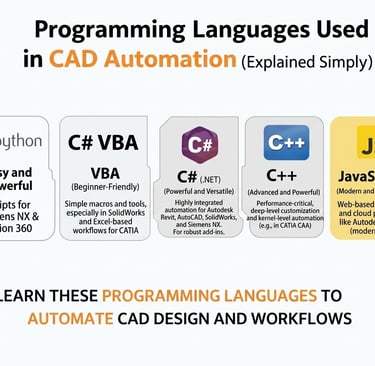
CAD Automation Languages Simply Explained
CAD automation is transforming the way engineers and designers work by reducing manual effort and increasing productivity. But behind every automated design process lies one important element—programming languages. If you're planning to enter the world of CAD automation, you might be wondering: Which programming languages should I learn? In this blog, we’ll explain the most commonly used languages in CAD automation in a simple and easy-to-understand way.
Introduction
CAD automation is transforming the way engineers and designers work by reducing manual effort and increasing productivity. But behind every automated design process lies one important element—programming languages.
If you're planning to enter the world of CAD automation, you might be wondering:
👉 Which programming languages should I learn?
In this blog, we’ll explain the most commonly used languages in CAD automation in a simple and easy-to-understand way.
Why Programming is Important in CAD Automation
Programming allows you to control CAD software beyond manual operations. Instead of repeating tasks, you can write scripts or applications to do the work automatically.
With programming, you can:
Automate repetitive design tasks
Create custom tools and features
Integrate CAD with other systems
Improve design accuracy and efficiency
Common Programming Languages Used in CAD Automation
1. VBScript / VBA (Beginner-Friendly)
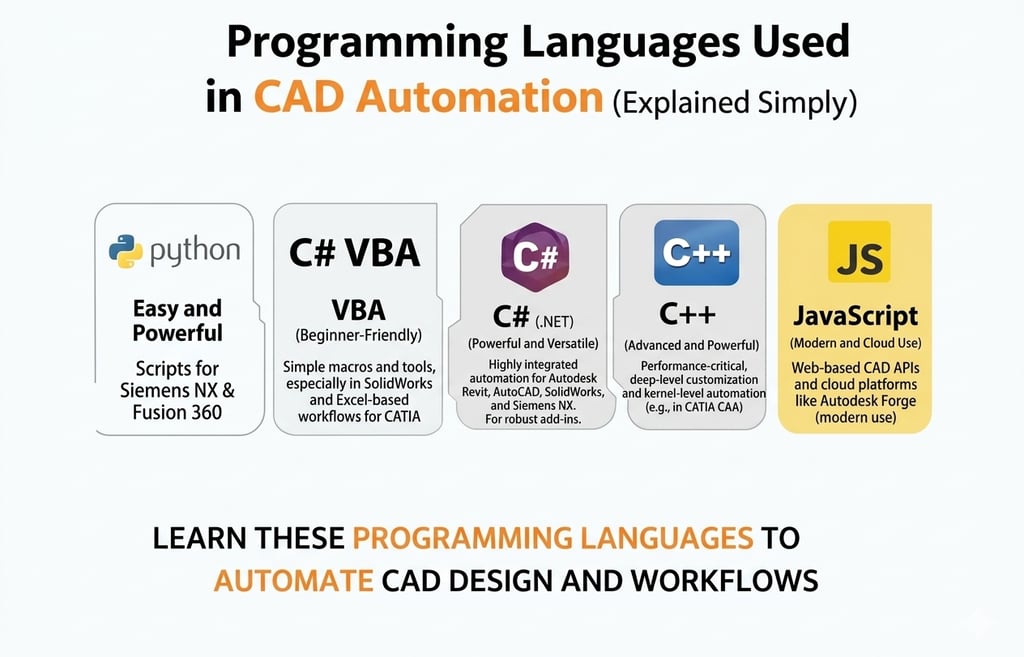
VBScript and VBA are among the easiest languages to start with in CAD automation. They are commonly used in tools like CATIA and SolidWorks for writing macros.
These languages are simple, require minimal setup, and are perfect for beginners who want to automate small tasks quickly. If you’re new to coding, this is the best place to start.
2. Python (Easy and Powerful)
Python is one of the most popular languages in CAD automation today. It is easy to learn, highly readable, and widely used in modern CAD tools like Siemens NX and Fusion 360.
Python is great for:
Automation scripts
Data processing
Integration with other software
Rapid development
It’s a perfect balance between simplicity and power.
3. C# (.NET) (Professional Level)
C# is widely used for developing advanced automation tools, especially in platforms like Siemens NX and SolidWorks.
It is part of the .NET framework and is ideal for:
Building custom applications
Creating user interfaces
Developing scalable automation solutions
C# is a great choice if you want to move beyond basic scripting and build professional-level tools.
4. C++ (Advanced and Powerful)
C++ is used for deep-level customization, especially in frameworks like CATIA CAA.
It provides full control over the CAD system, allowing developers to create complex features and integrations. However, it is more difficult to learn and requires strong programming knowledge.
C++ is best suited for advanced users and enterprise-level development.
5. JavaScript / Web Technologies (Modern Use)
With the rise of cloud-based CAD tools, JavaScript is becoming more relevant. Platforms like Fusion 360 and web-based applications use JavaScript for automation and extensions.
It is useful for:
Cloud automation
Web-based integrations
Modern CAD workflows
Which Language Should You Learn First?
If you are a beginner, start with VBScript/VBA or Python. These are easy to learn and help you understand the basics of automation.
Once you gain experience, you can move to C# for building advanced tools. If your goal is deep customization or working with enterprise solutions, learning C++ will be valuable.
Recommended Learning Path
Start simple and grow step by step:
Begin with VBScript or Python
Practice automation tasks in CAD software
Learn C# for advanced development
Move to C++ for high-level customization
This approach helps you build strong fundamentals and progress smoothly.
Conclusion
Programming languages are the backbone of CAD automation. Choosing the right language depends on your goals, experience, and the level of automation you want to achieve.
Start with easy languages, gain confidence, and gradually move towards advanced tools. With the right approach, you can unlock powerful automation capabilities and significantly enhance your engineering career.
Contact Us
💼 At Descode Solutions, we specialize in:
✔ CATIA & NX Automation Training
✔ Real-time Industry Projects
✔ CAD Customization & API Development
📈 Learn smarter. Automate faster. Grow your career.
📩 Looking to upgrade your skills or automate your design process? Connect with us today!
📞 Phone: +91 9544 123 321
🌐 www.descodesolutions.com
📧 info@descodesolutions.com
CAD Automation Training
Expert CAD Automation training for professionals and students
OUR COURSES
Contact
info@descodesolutions.com
(+91) 9544 123 321
Copyright © 2026 Descode Solutions LLP
NX Customization
CATIA Customization
AutoCAD Customization
Solidworks Customization
Solid Edge Customization
Revit Customization
Inventor Customization
Creo Customization