
How Manufacturing Companies Use CAD Automation
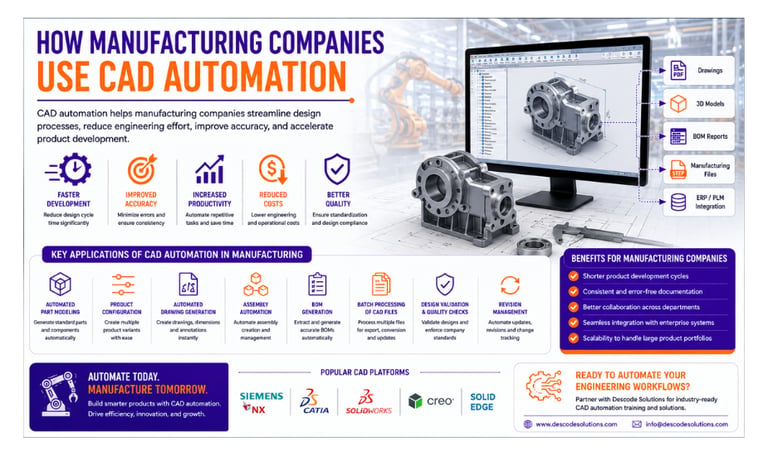
Discover how manufacturing companies use CAD automation to streamline design processes, reduce engineering effort, improve accuracy, and accelerate product development. Learn the key applications, benefits, and real-world examples of CAD automation in modern manufacturing environments.
6/18/20264 min read
Introduction
Manufacturing companies operate in highly competitive markets where speed, accuracy, and efficiency are critical to success. Engineers are often required to create product models, update drawings, generate Bills of Materials (BOMs), manage revisions, and prepare manufacturing documentation within tight deadlines.
Performing these tasks manually can be time-consuming and prone to errors, especially when dealing with large product portfolios or complex assemblies.
To overcome these challenges, many organizations are adopting CAD Automation.
By combining CAD software with APIs, scripts, macros, and custom applications, manufacturing companies can automate repetitive engineering tasks, improve productivity, and significantly reduce design cycle times.
What is CAD Automation?
CAD Automation is the process of using programming and software tools to automate tasks within CAD systems.
Automation can perform operations such as:
✔ Creating 3D models
✔ Updating dimensions and parameters
✔ Generating engineering drawings
✔ Creating Bills of Materials (BOMs)
✔ Exporting manufacturing files
✔ Managing design revisions
✔ Integrating with ERP and PLM systems
The goal is to reduce manual effort while ensuring consistency and accuracy.
Why Manufacturing Companies Need CAD Automation
Manufacturing organizations often handle:
Large volumes of CAD files
Repetitive product variations
Frequent design changes
Complex assemblies
Tight production schedules
Manual workflows can slow down project delivery and increase the risk of errors.
CAD automation helps manufacturers:
✔ Improve productivity
✔ Reduce engineering costs
✔ Accelerate product development
✔ Standardize design processes
✔ Enhance product quality
Common Uses of CAD Automation in Manufacturing
1. Automated Part Modeling
Many manufacturers produce standard components in multiple sizes and configurations.
Instead of creating each model manually, automation can generate parts automatically using predefined parameters.
Example
A company manufacturing brackets can input:
Length
Width
Thickness
Hole Size
The system automatically creates the required 3D model.
Benefits
✔ Faster modeling
✔ Improved consistency
✔ Reduced manual effort
2. Product Configuration Automation
Many products are customized based on customer requirements.
Examples include:
Industrial machinery
Storage systems
Electrical enclosures
Conveyor systems
CAD automation allows engineers to generate product variants automatically by entering customer specifications.
This reduces design time dramatically.
3. Automated Drawing Generation
Engineering drawings are essential for manufacturing operations.
Automation can generate:
Drawing views
Dimensions
Annotations
Title blocks
Revision tables
Benefits
✔ Faster documentation
✔ Consistent standards
✔ Reduced drafting workload
4. Assembly Automation
Manufacturing products often contain numerous components and subassemblies.
Automation can:
Insert components automatically
Apply assembly constraints
Validate assembly structures
Update assemblies after design changes
This improves efficiency when managing large assemblies.
5. BOM Generation
Bills of Materials are critical for purchasing, inventory management, and production planning.
CAD automation can:
✔ Extract component data automatically
✔ Generate BOM reports instantly
✔ Export information to Excel or ERP systems
This eliminates manual data entry and improves accuracy.
6. Batch Processing of CAD Files
Manufacturing companies frequently need to process hundreds of CAD files.
Automation can perform bulk operations such as:
PDF generation
STEP export
DXF export
Property updates
Drawing updates
A task that previously required hours can often be completed in minutes.
7. Design Validation and Quality Checks
Automation can verify whether designs meet company standards.
Examples include:
Material validation
Naming convention checks
Property verification
Manufacturing rule compliance
This helps reduce costly design errors before production.
8. Revision Management
Engineering changes occur frequently during product development.
CAD automation can:
Update revisions automatically
Regenerate drawings
Update BOMs
Track design changes
This ensures documentation remains accurate and up to date.
9. Manufacturing Documentation
Automation can generate production-ready documentation including:
PDF Drawings
DXF Files
STEP Files
Inspection Reports
Manufacturing Reports
This improves communication between engineering and production teams.
10. ERP and PLM Integration
Modern manufacturing relies heavily on data exchange between systems.
CAD automation can integrate with:
ERP Systems
PLM Platforms
Databases
Manufacturing Execution Systems (MES)
This enables seamless data flow across departments.
CAD Software Commonly Used in Manufacturing Automation
Popular CAD platforms include:
Siemens NX
CATIA
SolidWorks
Creo Parametric
These systems provide powerful APIs and customization capabilities for enterprise-level automation.
Real-World Example
Consider a manufacturing company producing industrial equipment.
Before Automation
Manual modeling of product variants
Individual drawing creation
Manual BOM preparation
Repetitive documentation work
Average engineering time per project:
Modeling: 10 Hours
Drawings: 6 Hours
BOM Creation: 3 Hours
Documentation: 5 Hours
Total: Approximately 24 Hours
After Automation
Using CAD automation:
✔ Models generated automatically
✔ Drawings created instantly
✔ BOMs generated automatically
✔ Manufacturing files exported in bulk
Total engineering time reduced to approximately 6 hours.
This allows engineers to focus on innovation rather than repetitive tasks.
Benefits of CAD Automation in Manufacturing
Faster Product Development
Products move from concept to production more quickly.
Improved Accuracy
Automation reduces manual errors and inconsistencies.
Increased Productivity
Engineers can handle more projects with the same resources.
Better Standardization
Design rules and company standards are applied automatically.
Reduced Costs
Less manual effort leads to lower engineering costs.
Improved Scalability
Companies can manage growing product portfolios more efficiently.
Challenges When Implementing CAD Automation
While automation provides significant benefits, companies may face challenges such as:
Initial development costs
Learning CAD APIs
Integration complexity
Change management
However, the long-term productivity gains often far outweigh the initial investment.
Future of CAD Automation in Manufacturing
Manufacturing is rapidly moving toward digital transformation.
Emerging technologies include:
✔ Artificial Intelligence (AI)
✔ Smart Manufacturing
✔ Digital Twins
✔ Industry 4.0
✔ Cloud-Based Engineering Platforms
CAD automation will continue to play a central role in improving efficiency and enabling intelligent engineering workflows.
Career Opportunities
As adoption grows, demand for CAD automation professionals continues to increase.
Popular roles include:
CAD Automation Engineer
Design Automation Engineer
CAD Customization Developer
Manufacturing Automation Engineer
Engineering Software Developer
Professionals who combine CAD expertise with programming skills are highly valued in modern manufacturing organizations.
Conclusion
CAD automation has become a powerful tool for manufacturing companies seeking to improve efficiency, reduce costs, and accelerate product development. From automated modeling and drawing generation to BOM creation and ERP integration, automation helps organizations eliminate repetitive work and focus on innovation.
As manufacturing continues to embrace digital engineering, CAD automation will remain a key driver of productivity and competitiveness.
Contact Us
💼 At Descode Solutions, we specialize in:
✔ CAD Automation Training
✔ CATIA, NX, Creo & SolidWorks Automation
✔ Real-time Industry Projects
✔ CAD Customization & API Development
📈 Learn smarter. Automate faster. Accelerate your career in CAD automation.
📩 Looking to implement CAD automation in your manufacturing workflows? Connect with us today!
📞 Phone: +91 9544 123 321
🌐 www.descodesolutions.com
📧 info@descodesolutions.com
CAD Automation Training
Expert CAD Automation training for professionals and students
OUR COURSES
Contact
info@descodesolutions.com
(+91) 9544 123 321
Copyright © 2026 Descode Solutions LLP
NX Customization
CATIA Customization
AutoCAD Customization
Solidworks Customization
Solid Edge Customization
Revit Customization
Inventor Customization
Creo Customization