
How CAD automation transforms design jobs
Discover how CAD automation is transforming mechanical design jobs by reducing repetitive work, increasing productivity, and creating new career opportunities for engineers. Learn how automation is reshaping the future of mechanical design and why developing CAD automation skills is becoming increasingly important.
6/25/20264 min read
Introduction
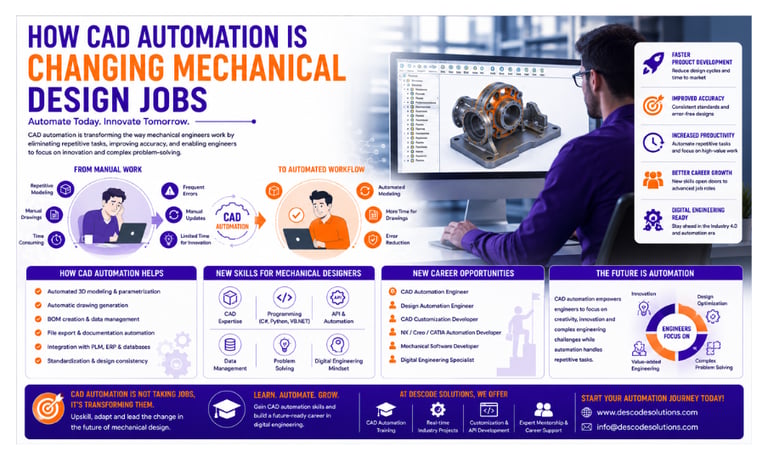
Mechanical design has traditionally been a highly manual process involving 3D modeling, drawing creation, design modifications, documentation, and engineering calculations. Engineers often spend a significant amount of time performing repetitive tasks that require precision but offer limited opportunities for innovation.
As industries become more competitive and products become increasingly complex, organizations are seeking ways to improve efficiency and accelerate product development.
This is where CAD Automation is making a significant impact.
By combining engineering knowledge with programming and automation technologies, CAD automation is transforming how mechanical engineers work, helping them deliver better designs in less time while opening new career paths in digital engineering.
What is CAD Automation?
CAD Automation is the use of programming, APIs, macros, and custom applications to automate tasks within CAD software.
Automation can perform tasks such as:
✔ Creating and modifying 3D models
✔ Generating engineering drawings
✔ Updating dimensions and parameters
✔ Creating Bills of Materials (BOMs)
✔ Exporting manufacturing files
✔ Managing revisions and documentation
✔ Integrating CAD with ERP and PLM systems
The primary goal is to reduce manual effort and improve engineering efficiency.
How Mechanical Design Jobs Have Traditionally Worked
In traditional mechanical design environments, engineers often spend considerable time on:
Repetitive modeling tasks
Manual drawing creation
Product configuration updates
BOM preparation
File exports and documentation
Design revisions and updates
While these activities are essential, they can consume a large portion of an engineer's working hours.
How CAD Automation is Changing Mechanical Design
1. Reducing Repetitive Work
Automation eliminates many repetitive engineering activities.
Instead of manually creating similar components repeatedly, engineers can use automation tools to generate designs automatically.
Example
A bracket family with multiple sizes can be created instantly by simply entering parameter values.
Benefits
✔ Reduced manual effort
✔ Faster design generation
✔ Improved consistency
2. Accelerating Product Development
Companies need to develop products faster than ever before.
CAD automation enables engineers to:
Generate models automatically
Create drawings instantly
Update design changes quickly
Produce manufacturing documentation automatically
This significantly reduces development cycles.
3. Improving Engineering Accuracy
Manual processes can introduce errors, especially when dealing with complex assemblies and multiple revisions.
Automation applies predefined rules and standards consistently.
Benefits include:
✔ Fewer design errors
✔ Better data consistency
✔ Improved product quality
4. Enabling Parametric Design
Modern mechanical design increasingly relies on parametric models.
Automation allows engineers to:
Define design parameters
Generate multiple product configurations
Update designs automatically
Reuse engineering knowledge efficiently
This makes design processes more flexible and scalable.
5. Integrating Engineering Systems
Today's engineering environments depend on connected systems.
CAD automation can integrate with:
ERP Systems
PLM Platforms
Databases
Manufacturing Systems
Excel and Reporting Tools
This creates seamless workflows across departments.
New Skills Required for Mechanical Designers
As automation becomes more common, the role of mechanical designers is evolving.
Modern engineers increasingly require knowledge of:
CAD Software
Siemens NX
Creo Parametric
SolidWorks
Solid Edge
Programming Languages
C#
VB.NET
Python
C++
JavaScript
Automation Technologies
CAD APIs
Macros and Scripting
Database Integration
API Development
Digital Engineering Tools
Engineers who develop these skills often gain significant career advantages.
New Career Opportunities Created by CAD Automation
The rise of automation has created several specialized roles.
Popular career paths include:
CAD Automation Engineer
Design Automation Engineer
CAD Customization Developer
NX Open Developer
CATIA Automation Engineer
Creo Automation Engineer
Mechanical Software Developer
These roles combine engineering expertise with programming and problem-solving skills.
Does CAD Automation Replace Mechanical Designers?
One of the biggest concerns among engineers is whether automation will replace design jobs.
The answer is No.
Automation is not replacing mechanical engineers. Instead, it is changing the nature of their work.
Automation handles repetitive and rule-based activities, allowing engineers to focus on:
✔ Product innovation
✔ Complex engineering problems
✔ Design optimization
✔ Customer requirements
✔ Strategic decision-making
Mechanical designers remain essential because engineering judgment, creativity, and problem-solving cannot be fully automated.
Real-World Example
Consider a company producing industrial machinery.
Before Automation
Engineers manually:
Created product variants
Generated drawings individually
Updated BOMs manually
Exported manufacturing files
Average project completion time:
Approximately 24 hours.
After Automation
Using CAD automation:
✔ Models generated automatically
✔ Drawings created instantly
✔ BOMs updated automatically
✔ Files exported automatically
Project completion time reduced to approximately 6 hours.
Engineers now spend more time improving designs and less time performing repetitive tasks.
Benefits for Mechanical Designers
CAD automation offers several advantages:
Increased Productivity
Engineers can complete more projects in less time.
Better Career Opportunities
Automation skills are increasingly in demand.
Improved Problem-Solving Skills
Engineers focus on high-value activities.
Exposure to Digital Engineering
Automation prepares professionals for Industry 4.0 environments.
Continuous Learning
The combination of CAD and programming creates exciting growth opportunities.
Future of Mechanical Design Jobs
Mechanical engineering is rapidly moving toward digital transformation.
Emerging technologies include:
✔ Artificial Intelligence (AI)
✔ Generative Design
✔ Digital Twins
✔ Smart Manufacturing
✔ Cloud-Based Engineering Platforms
✔ Data-Driven Engineering
Future mechanical design jobs will increasingly require a combination of:
Engineering knowledge
Programming skills
Automation expertise
Digital engineering capabilities
Engineers who embrace these technologies will be well-positioned for long-term success.
How to Start Learning CAD Automation
A practical learning path includes:
Step 1
Build strong mechanical engineering fundamentals.
Step 2
Master at least one CAD platform.
Step 3
Learn programming languages such as C# or Python.
Step 4
Understand CAD APIs and automation concepts.
Step 5
Build small automation projects.
Step 6
Create a portfolio and gain real-world experience.
Continuous learning and practical implementation are the keys to success.
Conclusion
CAD automation is fundamentally transforming mechanical design jobs. By reducing repetitive work, improving productivity, and enabling digital engineering workflows, automation is changing the way engineers design and develop products.
Rather than replacing mechanical designers, CAD automation is empowering them to focus on innovation, problem-solving, and high-value engineering activities.
As industries continue their digital transformation journey, engineers who combine CAD expertise with programming and automation skills will be among the most sought-after professionals in modern engineering.
Contact Us
💼 At Descode Solutions, we specialize in:
✔ CAD Automation Training
✔ CATIA, NX, Creo & SolidWorks Automation
✔ Real-time Industry Projects
✔ CAD Customization & API Development
📈 Learn smarter. Automate faster. Accelerate your career in CAD automation.
📩 Looking to build your future in CAD automation? Connect with us today!
📞 Phone: +91 9544 123 321
🌐 www.descodesolutions.com
📧 info@descodesolutions.com
CAD Automation Training
Expert CAD Automation training for professionals and students
OUR COURSES
Contact
info@descodesolutions.com
(+91) 9544 123 321
Copyright © 2026 Descode Solutions LLP
NX Customization
CATIA Customization
AutoCAD Customization
Solidworks Customization
Solid Edge Customization
Revit Customization
Inventor Customization
Creo Customization