
Case Study: Reducing Design Time Using Automation
Discover how CAD automation can dramatically reduce engineering design time, improve productivity, and eliminate repetitive work. This real-world-inspired case study demonstrates how automation transforms traditional design processes into faster, smarter, and more efficient workflows.
6/4/20263 min read
Introduction
In today's competitive engineering environment, companies are constantly challenged to deliver high-quality products faster while maintaining accuracy and reducing costs.
Many engineering teams spend a significant portion of their time performing repetitive tasks such as:
Creating standard models
Updating dimensions
Generating drawings
Exporting files
Producing BOMs
Managing design revisions
Although these activities are necessary, they often slow down product development and reduce engineering efficiency.
This case study demonstrates how implementing CAD automation helped a design company significantly reduce design time while improving consistency and productivity.
Company Background
A mid-sized engineering design company specialized in:
Industrial Equipment Design
Manufacturing Components
Custom Product Development
The company handled multiple projects simultaneously and produced hundreds of CAD models and drawings every month.
As project volumes increased, the engineering team began experiencing workflow bottlenecks.
Challenges Before Automation
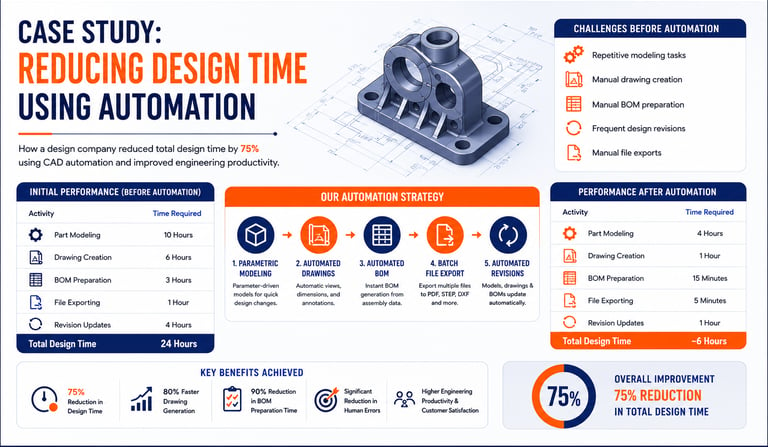
The design team faced several challenges:
Repetitive Modeling Tasks
Engineers repeatedly created similar parts with minor dimensional changes.
Manual Drawing Creation
Every model required manual drawing generation and annotation.
BOM Preparation
Bills of Materials were prepared manually, consuming valuable engineering time.
Frequent Design Revisions
Customer modifications required engineers to update multiple files repeatedly.
File Export Activities
Engineers manually exported drawings into PDF, STEP, and DXF formats.
Initial Performance Metrics
Before automation, a typical engineering project required approximately 24 hours to complete. This included 10 hours for part modeling, 6 hours for drawing creation, 3 hours for BOM preparation, 1 hour for file exporting, and 4 hours for revision updates. For larger projects involving multiple components and frequent design changes, the total time required increased significantly, creating challenges in productivity and project delivery timelines.
Automation Strategy
The company decided to implement CAD automation using APIs, macros, and custom engineering tools.
The automation project focused on five key areas:
1. Parametric Model Automation
Standard parts were converted into parametric models.
Engineers only needed to enter design parameters such as:
Length
Width
Height
Hole Diameter
Material Thickness
Models updated automatically.
2. Automated Drawing Generation
Custom automation tools automatically generated:
✔ Standard views
✔ Dimensions
✔ Annotations
✔ Title Blocks
This eliminated repetitive drafting work.
3. Automated BOM Creation
The automation system extracted assembly data and generated Bills of Materials automatically.
No manual data entry was required.
4. Batch File Export
Automation tools exported:
PDF Files
STEP Files
DXF Files
for multiple components in a single operation.
5. Automated Revision Management
Whenever model parameters changed:
✔ Drawings updated automatically
✔ BOMs refreshed instantly
✔ Documentation remained synchronized
This greatly reduced revision effort.
Implementation Tools
The company used:
CAD APIs
VBA Macros
C# Applications
Custom Automation Scripts
The solution was integrated directly into the company's existing CAD workflow.
Results After Automation
After implementing CAD automation, the company's design workflow became significantly faster and more efficient. The time required for part modeling was reduced from 10 hours to 4 hours, while drawing creation decreased from 6 hours to just 1 hour. BOM preparation, which previously took 3 hours, was completed in only 15 minutes, and file exporting was reduced from 1 hour to just 5 minutes. Additionally, revision updates dropped from 4 hours to 1 hour. As a result, the total design time for a typical project was reduced from 24 hours to approximately 6 hours, achieving a 75% reduction in engineering effort and allowing teams to deliver projects faster with greater accuracy and consistency.
Overall Improvement
The company achieved:
🚀 75% Reduction in Design Time
🚀 80% Faster Drawing Generation
🚀 90% Reduction in BOM Preparation Time
🚀 Significant Reduction in Human Errors
🚀 Improved Engineering Productivity
Additional Benefits
Beyond time savings, the company experienced several additional advantages.
Better Design Consistency
All engineers followed the same automated workflow.
Reduced Human Errors
Automation eliminated repetitive manual operations.
Faster Project Delivery
Projects reached manufacturing more quickly.
Improved Customer Satisfaction
Faster response times allowed quicker implementation of customer revisions.
Increased Engineering Capacity
Engineers could focus on innovation rather than repetitive tasks.
Real-World Applications
Similar automation solutions are commonly used in:
Automotive Industry
Automated component generation and assembly management.
Aerospace Industry
Automated documentation and design validation.
Manufacturing Industry
Batch processing and standard part creation.
Tool & Die Design
Automated mold and fixture design workflows.
Industrial Equipment Design
Configuration-driven engineering automation.
Key Lessons Learned
The company identified several important lessons during implementation.
Start Small
Begin with simple repetitive tasks before automating complex workflows.
Standardize Processes
Automation works best when workflows are clearly defined.
Invest in Training
Engineers should understand both CAD software and programming concepts.
Focus on High-Impact Tasks
Prioritize automation opportunities that deliver the greatest time savings.
Future Expansion Plans
Following the success of the project, the company planned to implement:
✔ AI-Assisted Design Automation
✔ Automated Design Validation
✔ Cloud-Based CAD Automation
✔ Smart Engineering Workflows
✔ Digital Manufacturing Integration
These initiatives aim to further improve engineering efficiency.
Why Automation Matters Today
As engineering projects become increasingly complex, manual workflows are becoming less practical.
Companies that embrace CAD automation gain advantages such as:
Faster product development
Improved quality
Lower engineering costs
Better scalability
Increased competitiveness
Automation is no longer optional—it is becoming a strategic necessity.
Conclusion
This case study demonstrates how CAD automation can significantly reduce design time while improving quality, consistency, and productivity.
By automating repetitive tasks such as modeling, drawing generation, BOM creation, file exports, and revision management, engineering teams can focus more on innovation and less on manual work.
Organizations that invest in automation today are better positioned to meet future engineering challenges and accelerate product development.
Contact Us
💼 At Descode Solutions, we specialize in:
✔ CATIA & NX Automation Training
✔ Real-time Industry Projects
✔ CAD Customization & API Development
📈 Learn smarter. Automate faster. Accelerate your career in CAD automation.
📩 Looking to implement CAD automation or build automation skills? Connect with us today!
📞 Phone: +91 9544 123 321
🌐 www.descodesolutions.com
📧 info@descodesolutions.com
CAD Automation Training
Expert CAD Automation training for professionals and students
OUR COURSES
Contact
info@descodesolutions.com
(+91) 9544 123 321
Copyright © 2026 Descode Solutions LLP
NX Customization
CATIA Customization
AutoCAD Customization
Solidworks Customization
Solid Edge Customization
Revit Customization
Inventor Customization
Creo Customization