
Building Custom CAD Tools for Your Organization
Discover how custom CAD tools can transform engineering workflows by automating repetitive tasks, improving design accuracy, and increasing productivity. Learn why organizations are investing in CAD customization and how tailored automation solutions can provide a competitive advantage.
6/29/20263 min read
Introduction
In today's fast-paced engineering environment, organizations constantly seek ways to improve productivity, reduce manual effort, and accelerate product development. Engineers often spend significant time performing repetitive tasks such as creating similar models, generating drawings, updating design parameters, and preparing documentation.
While modern CAD software offers powerful built-in capabilities, every organization has unique workflows, standards, and business requirements that generic tools may not fully address.
This is where Custom CAD Tools become valuable.
By developing tailored automation solutions, companies can streamline engineering processes, eliminate repetitive work, and create efficient workflows designed specifically for their business needs.
What Are Custom CAD Tools?
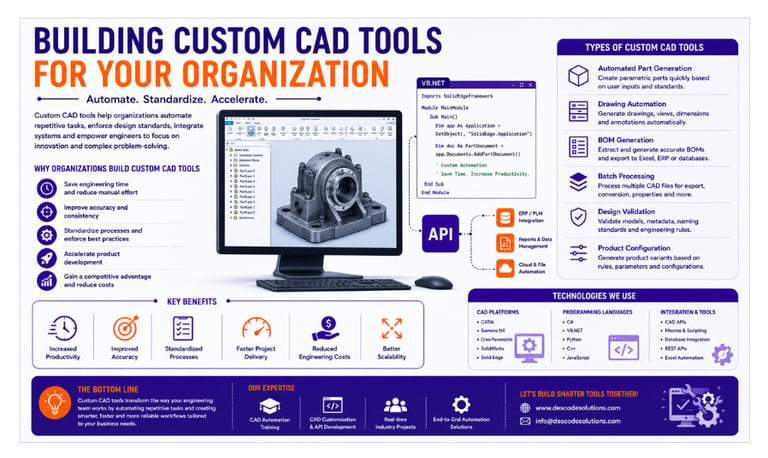
Custom CAD tools are applications, scripts, macros, or software extensions developed specifically to automate tasks and enhance the functionality of CAD systems.
These tools can:
✔ Automate repetitive design tasks
✔ Generate models and drawings automatically
✔ Create Bills of Materials (BOMs)
✔ Export manufacturing files
✔ Validate design standards
✔ Integrate CAD with ERP and PLM systems
✔ Generate reports and documentation
Unlike standard CAD features, custom tools are designed to match an organization's specific engineering processes.
Why Organizations Build Custom CAD Tools
Many companies deal with:
Large numbers of CAD files
Repetitive design activities
Frequent product variations
Complex assemblies
Strict engineering standards
Tight project deadlines
Performing these activities manually can slow productivity and increase the risk of errors.
Custom CAD tools help organizations:
✔ Save engineering time
✔ Improve accuracy and consistency
✔ Reduce repetitive work
✔ Standardize processes
✔ Accelerate product development
✔ Improve collaboration across teams
Common Types of Custom CAD Tools
1. Automated Part Generation Tools
Many companies manufacture products with standard components available in different sizes and configurations.
Custom tools can automatically generate parts based on user-defined parameters such as:
Length
Width
Thickness
Hole size
Material specifications
Benefits
✔ Faster modeling
✔ Consistent designs
✔ Reduced manual effort
2. Drawing Generation Tools
Creating engineering drawings manually can be time-consuming.
Custom applications can automatically:
Create drawing views
Add dimensions
Insert annotations
Generate title blocks
Update revision information
Benefits
✔ Faster documentation
✔ Improved consistency
✔ Reduced drafting effort
3. BOM Generation Tools
Bills of Materials are essential for manufacturing and procurement.
Custom tools can:
✔ Extract component data automatically
✔ Generate BOM reports instantly
✔ Export data to Excel, ERP, or databases
This eliminates manual data entry and improves data accuracy.
4. Batch Processing Tools
Organizations often need to process hundreds of CAD files.
Custom tools can automate:
PDF generation
STEP export
DXF export
Property updates
Drawing regeneration
File conversions
Tasks that once required several hours can often be completed in minutes.
5. Design Validation Tools
Engineering companies follow strict design standards and naming conventions.
Custom validation tools can automatically verify:
Material information
File properties
Naming standards
Parameter values
Assembly rules
This reduces design errors before manufacturing.
6. Product Configuration Tools
Companies offering customized products often create numerous design variations.
Custom configurators can automatically generate product models based on:
Customer requirements
Engineering rules
Product parameters
Design templates
This significantly reduces design cycle times.
Benefits of Building Custom CAD Tools
Increased Productivity
Engineers spend less time on repetitive tasks and more time on innovation.
Improved Accuracy
Automation minimizes human errors and ensures consistency.
Standardized Processes
Company standards and best practices can be applied automatically.
Faster Project Delivery
Projects move from design to manufacturing more quickly.
Reduced Engineering Costs
Less manual effort leads to significant cost savings.
Better Scalability
Organizations can manage larger projects and product portfolios efficiently.
Technologies Used for CAD Customization
Popular technologies used for building custom CAD tools include:
CAD Platforms
Siemens NX
Creo Parametric
SolidWorks
Solid Edge
Programming Languages
C#
VB.NET
Python
C++
JavaScript
Development Technologies
CAD APIs
Macros and Scripting
Database Integration
REST APIs
Windows Applications
Excel Automation
These technologies allow organizations to build powerful and scalable engineering solutions.
Real-World Example
Consider a manufacturing company producing industrial equipment.
Before Custom Tool Development
Engineers manually:
Created product variants
Generated drawings individually
Prepared BOMs manually
Exported manufacturing files
Average project completion time:
Approximately 20 hours.
After Implementing Custom CAD Tools
Using customized automation solutions:
✔ Models generated automatically
✔ Drawings created instantly
✔ BOMs generated automatically
✔ Manufacturing files exported automatically
Project completion time reduced to approximately 5 hours.
This allows engineering teams to handle more projects while maintaining quality and consistency.
Challenges When Developing Custom CAD Tools
Although customization offers significant benefits, organizations may encounter challenges such as:
Understanding CAD APIs
Initial development costs
Integration complexity
User training requirements
Maintenance and updates
However, the long-term productivity improvements usually provide an excellent return on investment.
Best Practices for Building Custom CAD Tools
To maximize success:
✔ Clearly identify repetitive tasks
✔ Understand current engineering workflows
✔ Start with small automation projects
✔ Build scalable and reusable solutions
✔ Test thoroughly before deployment
✔ Provide proper user training
✔ Continuously improve tools based on feedback
Future of Custom CAD Tools
As industries move toward digital transformation, custom CAD applications are becoming increasingly intelligent.
Emerging technologies include:
✔ Artificial Intelligence (AI)
✔ Generative Design
✔ Digital Twins
✔ Smart Manufacturing
✔ Cloud-Based Engineering Platforms
✔ Data-Driven Design Systems
Organizations investing in custom CAD solutions today will be better prepared for the future of digital engineering.
Conclusion
Building custom CAD tools enables organizations to automate repetitive tasks, improve engineering efficiency, and create workflows tailored to their specific business requirements. From automated modeling and drawing generation to BOM creation and system integration, customized solutions provide significant productivity gains and long-term competitive advantages.
As engineering processes become increasingly digital, custom CAD tools will continue to play a critical role in helping organizations work smarter, faster, and more efficiently.
Contact Us
💼 At Descode Solutions, we specialize in:
✔ CAD Automation Training
✔ CATIA, NX, Creo & SolidWorks Customization
✔ Real-time Industry Projects
✔ CAD Customization & API Development
📈 Learn smarter. Automate faster. Accelerate your engineering workflows.
📩 Looking to build custom CAD tools for your organization? Connect with us today!
📞 Phone: +91 9544 123 321
🌐 www.descodesolutions.com
📧 info@descodesolutions.com
CAD Automation Training
Expert CAD Automation training for professionals and students
OUR COURSES
Contact
info@descodesolutions.com
(+91) 9544 123 321
Copyright © 2026 Descode Solutions LLP
NX Customization
CATIA Customization
AutoCAD Customization
Solidworks Customization
Solid Edge Customization
Revit Customization
Inventor Customization
Creo Customization